
Central Angle Exploration: Relationship to Regular Polygon Sides
Loading the math board and drawing, please wait…
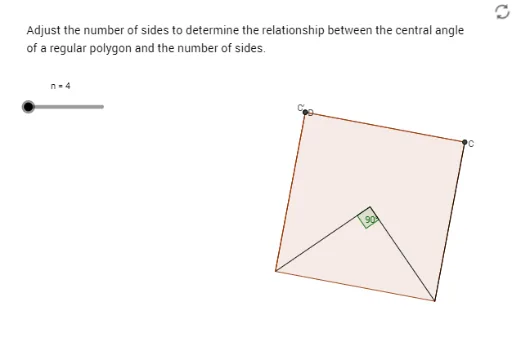
This GeoGebra example dynamically explores how the central angle (the angle subtended by each side at the center) of a regular polygon depends on the number of sides. The core mathematical concepts include regular polygon symmetry, the relationship between central and inscribed angles, and the pattern of angle change as the side count increases. The construction uses commands such as Circle to create the circumcircle, Segment and Rotate to generate polygon edges, Angle to measure the central angle α, and a slider n to control the number of sides. Additional tools like Polygon, Ray, Midpoint, Intersect, LineBisector, and Mirror are employed to build auxiliary lines, angle bisectors, and symmetric figures, visually demonstrating that as n grows, the central angle decreases and approaches 0°. This resource is suitable for middle school to high school geometry lessons, classroom demonstrations, or student self-exploration, and can also serve as an intuitive introduction to the concept of limits.
GeoGebra Commands & Parameters
Circle(A, B) → cSegment(A, B) → aRotate(B, (360 / n)°, A) → B'Angle(B, A, B') → αPolygon(B, B', n) → poly1, b, m, p, q, C, D, E, F, G, H, I, d, J, K, L, e, f, h, i, j, k, lSegment(A, B') → gRay(B', B) → rMidpoint(b) → MCircle(B, M) → sIntersect(s, r) → N, OSegment(B', C) → a_1LineBisector(b) → b_1Mirror(B', b_1) → B''Mirror(C, b_1) → C'Segment(B'', C') → d'Midpoint(d) → PMirror(P, b_1) → P'
AI Drawing Prompt Reference
Draw a circle with a fixed center and a point on the circumference as the starting vertex. Draw a radius from the center to this vertex. Then rotate the vertex around the center by an adjustable angle controlled by a slider, creating a second vertex. Connect the center to the second vertex and measure the angle between the two radii. Using these two vertices as adjacent vertices, construct a regular polygon with the number of sides equal to the slider value, all vertices lying on the circle. Then, from the second vertex, draw a ray to the starting vertex, and construct auxiliary lines, midpoints, angle bisectors, and symmetric figures to illustrate how the central angle changes as the number of sides increases.
The prompt above was compiled from the original drawing commands and is for reference only.