
Quadratic Functions, Derivatives, Tangent Line
Loading the math board and drawing, please wait…
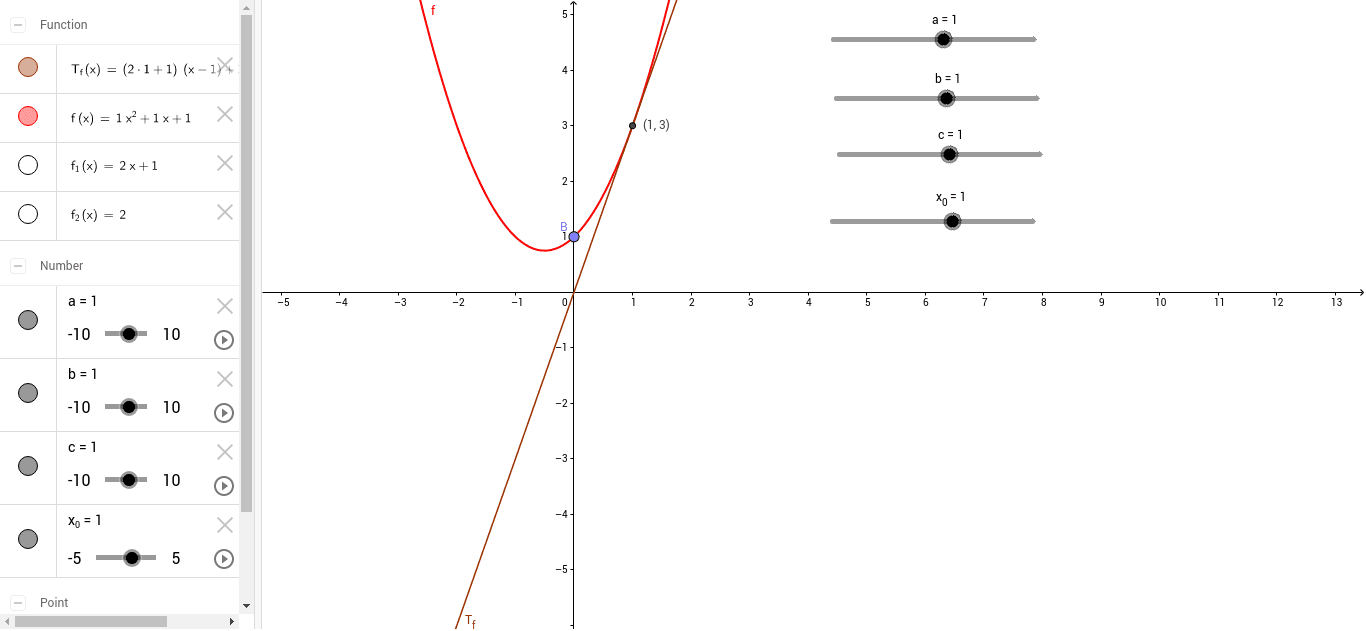
This example demonstrates how to graph quadratic functions and their derivatives using GeoGebra, along with the construction of tangent lines. Key mathematical concepts involved include quadratic functions, derivatives, tangent line equations, and coordinate geometry. Construction highlights involve using commands like Point to create key objects such as a, b, c, f, B, f_1, f_2, x_0, T_f, P, and leveraging these to build function graphs, derivative graphs, and tangent lines. Suitable for high school mathematics education to help students understand the relationships between functions, derivatives, and tangent lines.
GeoGebra Commands & Parameters
Point(f) → B
AI Drawing Prompt Reference
Draw a quadratic function and its derivative, along with their tangent lines. Start by plotting the quadratic function f(x) = ax^2 + bx + c, then find its derivative f'(x). Next, choose a point x_0 on the x-axis and construct the tangent line T_f to the quadratic function at that point. Finally, plot the graph of the derivative function f'(x) and construct the tangent line P to the derivative at x_0.
The prompt above was compiled from the original drawing commands and is for reference only.