
Quadratic Formula Steps Demonstration
Loading the math board and drawing, please wait…
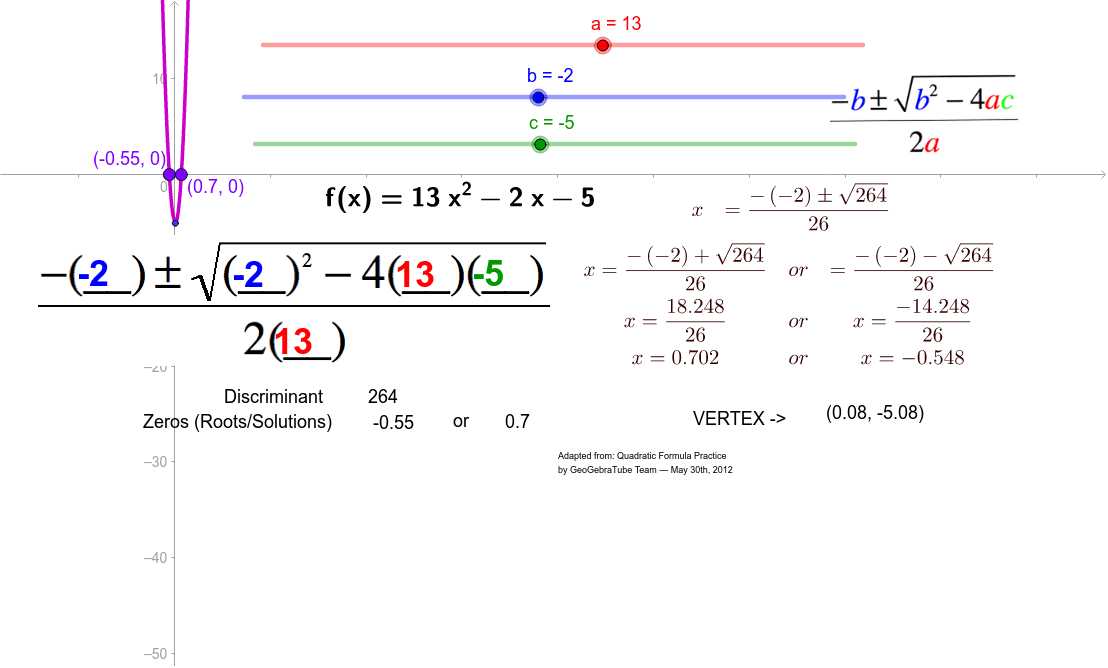
This example demonstrates how to solve quadratic equations using the quadratic formula, covering core concepts like quadratic equations, discriminant, and the root formula. It utilizes GeoGebra commands/objects such as Root (for finding roots), Text (for displaying text), and variables c, b, a (coefficients), along with geometric objects A, B, g, h, and images pic1, pic2, pic3. Points E, F, and multiple text objects (text1 to text17) are also used. Suitable for middle school students and above for learning and practicing quadratic equation solving, as well as for mathematical teaching demonstrations.
GeoGebra Commands & Parameters
Root(f) → A, BText(a) → text6Text(a) → text7Text(b) → text8Text(b) → text9Text(c) → text10Text(VT) → text4Text(d) → text12Text(x(A)) → text14Text(x(B)) → text15
AI Drawing Prompt Reference
Draw the graph of a quadratic function, highlighting its two roots with clear labels. Display the values of coefficients a, b, and c, and include text annotations for the vertex and discriminant. Label the x-coordinates of each root explicitly on the graph. Use distinct colors or shapes for key points and text to enhance clarity, making it suitable for educational purposes.
The prompt above was compiled from the original drawing commands and is for reference only.