
Pythagorean Theorem - Hypotenuse Calculation
Loading the math board and drawing, please wait…
In collections
Pythagoras
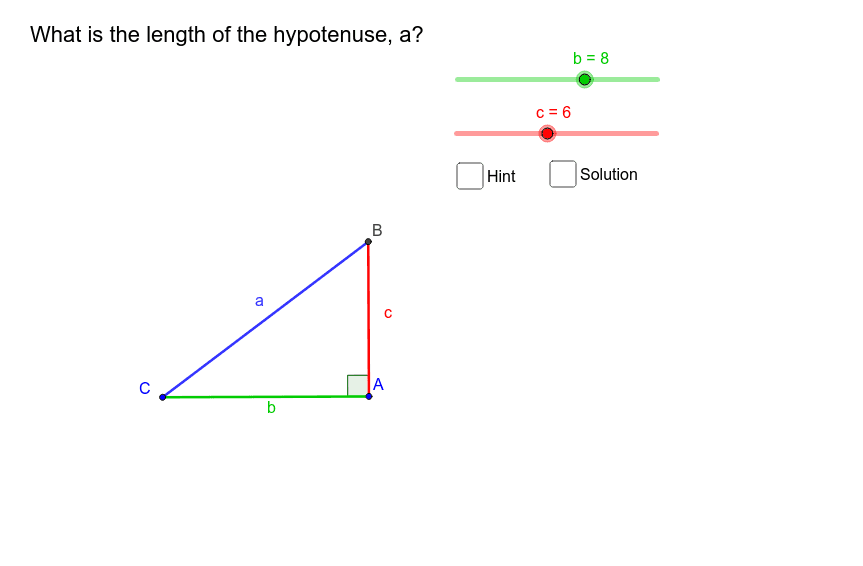
This example demonstrates the calculation of the hypotenuse in a right triangle by dynamically changing the lengths of the two legs. It involves the core mathematical concept of the Pythagorean Theorem. The construction uses commands/objects like Circle, Point, Segment, OrthogonalLine, Intersect, and Angle from GeoGebra. It is suitable for middle school students and above to learn and understand the application of the Pythagorean Theorem.
GeoGebra Commands & Parameters
Circle(A, b) → c_2Circle(A, c) → dPoint(c_2) → CSegment(C, A) → eOrthogonalLine(A, e) → fIntersect(d, f, 2) → BSegment(A, B) → gAngle(C, A, B) → αIntersect(c_2, e, 1) → DSegment(B, D) → hSegment(A, D) → iSegment(C, B) → jCircle(A_1, b) → c_1Circle(A_1, c) → d_1Point(c_1) → B_1Segment(B_1, A_1) → e_1OrthogonalLine(A_1, e_1) → f_1Intersect(d_1, f_1, 2) → C_1Segment(A_1, C_1) → g_1Angle(B_1, A_1, C_1) → α_1Intersect(c_1, e_1, 1) → D_1Segment(C_1, D_1) → h_1Segment(A_1, D_1) → i_1Segment(B_1, C_1) → j_1
AI Drawing Prompt Reference
Draw a right triangle with two sliders to dynamically change the lengths of the legs, showing how the hypotenuse length changes. Draw circles with the legs as radii, connect the intersection points to form a triangle, and highlight the hypotenuse. Then, draw another triangle using the right-angle vertex as the center and the hypotenuse as the radius, demonstrating the Pythagorean theorem.
The prompt above was compiled from the original drawing commands and is for reference only.