
Pythagoras Theorem
Loading the math board and drawing, please wait…
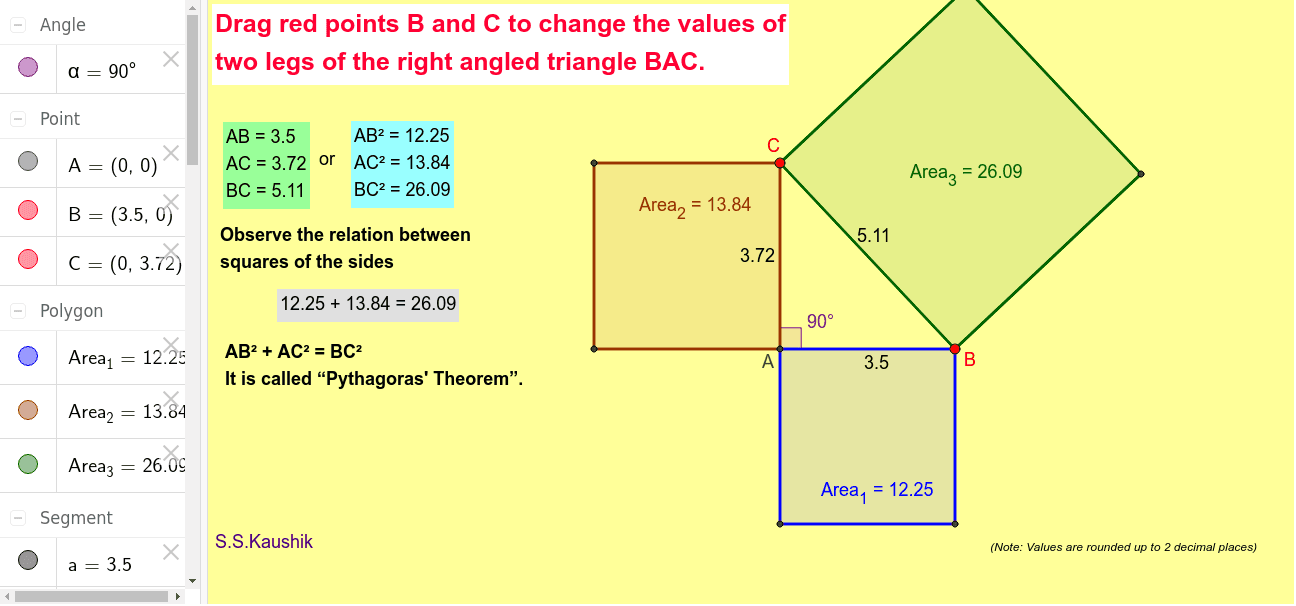
This example illustrates the Pythagorean Theorem, which states that in a right-angled triangle, the square of the length of the hypotenuse (the side opposite the right angle) is equal to the sum of the squares of the lengths of the other two sides. It involves key mathematical concepts such as right triangles and triangle area. Using GeoGebra commands like Intersect, Point, Segment, etc., it dynamically demonstrates the construction of a right triangle. Suitable for middle school and above students to learn geometry and trigonometry.
GeoGebra Commands & Parameters
Intersect(xAxis, yAxis) → APoint(xAxis) → BSegment(A, B) → aPoint(yAxis) → CSegment(A, C) → bSegment(C, B) → cAngle(B, A, C) → αPolygon(C, B, 4) → Area_3, d, e, f, g, D, EPolygon(B, A, 4) → Area_1, h, i, j, k, F, GPolygon(A, C, 4) → Area_2, l, m, n, p, H, I
AI Drawing Prompt Reference
Draw a right triangle with the right angle at the origin, one leg along the positive x-axis and the other along the positive y-axis. Place a point on the x-axis and another on the y-axis, then connect these three points to form the triangle. Construct a square outward on each side of the triangle, so that the square on the hypotenuse has area equal to the sum of the areas of the other two squares, illustrating the Pythagorean theorem. Clearly mark the right angle and ensure the squares align perfectly with the triangle sides.
The prompt above was compiled from the original drawing commands and is for reference only.