
Pyramid Volume Conjecture
Loading the math board and drawing, please wait…
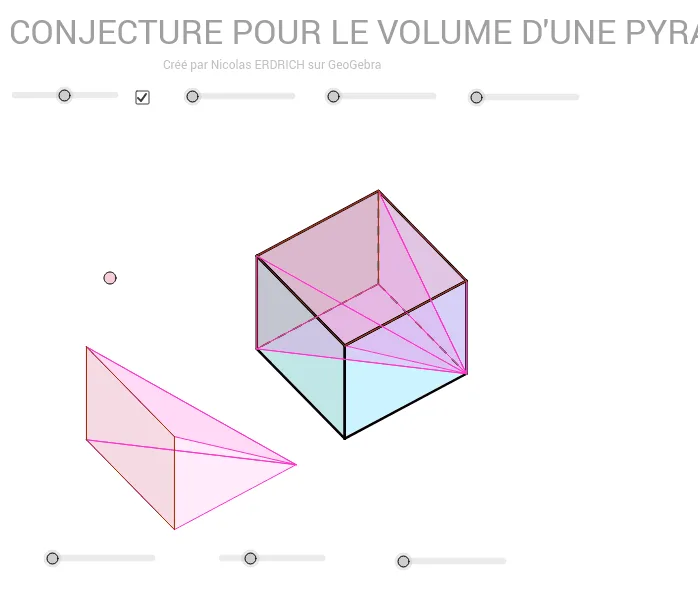
This example demonstrates the conjecture for the volume of a pyramid. Key mathematical concepts include solid geometry volume calculations. Using GeoGebra commands such as Sequence, Element, Point, Polygon, etc., the construction process of the pyramid is dynamically shown. Suitable for high school or university solid geometry studies.
GeoGebra Commands & Parameters
Sequence(Mat * Element[cube, k], k, 1, 8) → cube'Element(Element[AE, 3], 1) → droiteSequence((Element[cube', k, 1, 1], Element[cube', k, 2, 1]), k, 1, 8) → listepointsPoint(listepoints) → APoint(listepoints) → EPoint(listepoints) → C_1Point(listepoints) → DPolygon(A, E, C_1, D) → poly1, a_1, b, c_1, dPoint(listepoints) → BPoint(listepoints) → FPoint(listepoints) → GPoint(listepoints) → HPolygon(B, F, G, H) → poly2, e, f, g, hPoint(listepoints) → CPolygon(F, C, A, B) → poly3, f_1, i, a_2, b_1Element(AB, 3, 1) → avantPolygon(C_1, G, H, E) → poly4, c_2, g_1, h_1, e_1Element(AC, 3, 1) → dessusPolygon(F, C, C_1, G) → poly5, f_2, c_3, c_4, g_2Polygon(A, B, H, E) → poly6, a_3, b_2, h_2, e_2Segment(E, A) → cSegment(A, C) → jSegment(A, B) → kSegment(C, C_1) → lSegment(C_1, E) → mSegment(H, E) → nSegment(A, B) → pSegment(B, H) → qSegment(H, E) → rSegment(H, G) → sSegment(B, F) → tSegment(G, C_1) → d_1Segment(F, G) → i_1Segment(F, C) → j_1PointIn(poly5) → JTranslate(J, Vector[val1 * Vector[A, B]]) → pyr1_1Translate(A, Vector[val1 * Vector[A, B]]) → pyr1_2Translate(B, Vector[val1 * Vector[A, B]]) → pyr1_3Translate(H, Vector[val1 * Vector[A, B]]) → pyr1_4Translate(E, Vector[val1 * Vector[A, B]]) → pyr1_5Polygon(pyr1_1, pyr1_2, pyr1_3) → poly11, pyr1_6, pyr1_7, pyr1_8Polygon(pyr1_1, pyr1_3, pyr1_4) → poly12, pyr1_9, pyr1_{10}, pyr1_{11}Polygon(pyr1_5, pyr1_1, pyr1_2) → poly13, pyr1_{12}, pyr1_{13}, pyr1_{14}Polygon(pyr1_5, pyr1_4, pyr1_3, pyr1_2) → poly14, pyr1_{15}, pyr1_{16}, pyr1_{17}, pyr1_{18}Translate(J, Vector[val2 * Vector[A, E]]) → pyr2_1Translate(E, Vector[val2 * Vector[A, E]]) → pyr2_2Translate(H, Vector[val2 * Vector[A, E]]) → pyr2_3Translate(C_1, Vector[val2 * Vector[A, E]]) → pyr2_4Translate(G, Vector[val2 * Vector[A, E]]) → pyr2_5Polygon(pyr2_1, pyr2_2, pyr2_3) → poly15, pyr2_6, pyr2_7, pyr2_8Polygon(pyr2_1, pyr2_4, pyr2_5) → poly16, pyr2_9, pyr2_{10}, pyr2_{11}Polygon(pyr2_1, pyr2_3, pyr2_5) → poly17, pyr2_{12}, pyr2_{13}, pyr2_{14}Polygon(pyr2_4, pyr2_2, pyr2_3, pyr2_5) → poly18, pyr2_{15}, pyr2_{16}, pyr2_{17}, pyr2_{18}Translate(J, Vector[val3 * Vector[D, A]]) → pyr3_1Translate(F, Vector[val3 * Vector[D, A]]) → pyr3_2Translate(B, Vector[val3 * Vector[D, A]]) → pyr3_3Translate(G, Vector[val3 * Vector[D, A]]) → pyr3_4Translate(H, Vector[val3 * Vector[D, A]]) → pyr3_5Polygon(pyr3_1, pyr3_3, pyr3_2) → poly19, pyr3_6, pyr3_7, pyr3_8Polygon(pyr3_2, pyr3_4, pyr3_5, pyr3_3) → poly20, pyr3_9, pyr3_{10}, pyr3_{11}, pyr3_{12}Polygon(pyr3_1, pyr3_2, pyr3_4) → poly21, pyr3_{13}, pyr3_{14}, pyr3_{15}Polygon(pyr3_1, pyr3_5, pyr3_4) → poly22, pyr3_{16}, pyr3_{17}, pyr3_{18}
AI Drawing Prompt Reference
Draw a pyramid with base ABCD and apex E. Start by creating a cube, then generate the pyramid's vertices from the cube's vertices, such as A, B, C, D, E, F, G, H. Next, connect these vertices to form the pyramid's faces, like the base ABCD, side ABHE, side BFGH, etc. Finally, translate the pyramid's faces to create multiple copies of the pyramid and observe the changes in its volume.
The prompt above was compiled from the original drawing commands and is for reference only.