
Pyramid in a Cube
Loading the math board and drawing, please wait…
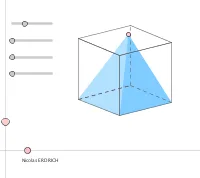
This example demonstrates a pyramid within a cube. It involves basic concepts of solid geometry, such as polyhedra and spatial figures. Using GeoGebra commands like Polygon, Segment, and PointIn, the pyramid's faces and vertices can be constructed. Suitable for middle and high school students learning solid geometry.
GeoGebra Commands & Parameters
OrthogonalLine(I, xAxis) → l_1OrthogonalLine(I, l_1) → m_1Point(m_1) → KPoint(l_1) → PSequence(Mat * Element[cube, k], k, 1, 8) → cube'Element(Element[AE, 3], 1) → droiteSequence((Element[cube', k, 1, 1], Element[cube', k, 2, 1]), k, 1, 8) → listepointsPoint(listepoints) → APoint(listepoints) → EPoint(listepoints) → C_1Point(listepoints) → DPolygon(A, E, C_1, D) → poly1, a_1, b, c_1, dPoint(listepoints) → BPoint(listepoints) → FPoint(listepoints) → GPoint(listepoints) → HPolygon(B, F, G, H) → poly2, e, f, g, hPoint(listepoints) → CPolygon(F, C, A, B) → poly3, f_1, i, a_2, b_1Element(AB, 3, 1) → avantPolygon(C_1, G, H, E) → poly4, c_2, g_1, h_1, e_1Element(AC, 3, 1) → dessusPolygon(F, C, C_1, G) → poly5, f_2, c_3, c_4, g_2Polygon(A, B, H, E) → poly6, a_3, b_2, h_2, e_2Segment(E, A) → cSegment(A, C) → jSegment(A, B) → kSegment(C, C_1) → lSegment(C_1, E) → mSegment(H, E) → nSegment(A, B) → pSegment(B, H) → qSegment(H, E) → rSegment(H, G) → sSegment(B, F) → tSegment(G, C_1) → d_1Segment(F, G) → i_1Segment(F, C) → j_1PointIn(poly5) → JSegment(J, E) → k_1Polygon(J, E, H) → poly7, h_3, j_2, e_3Polygon(J, H, B) → poly8, b_3, j_3, h_4Polygon(J, E, A) → poly9, a_4, j_4, e_4Polygon(J, A, B) → poly10, b_4, j_5, a_5Angle(Line[A, E], Line[A, J]) → ang1Angle(Line[E, H], Line[E, J]) → ang2Angle(Line[H, B], Line[H, J]) → ang3Angle(Line[B, A], Line[B, J]) → ang4Polygon(A, B, H, E) → poly11, a_6, b_5, h_5, e_5Angle(Line[B, H], Line[B, A]) → ang5
AI Drawing Prompt Reference
Draw a cube and construct a pyramid inside it. Start by defining the cube's eight vertices and connecting edges to form its six faces. Choose an interior point on one side face of the cube as the apex of the pyramid. Connect this apex to the four vertices of that face to create the pyramid's four triangular side faces. Also draw auxiliary segments on other faces to clearly show the spatial relationship between the pyramid and the cube. Finally, mark the angles between the apex and the edges of the base to illustrate the angular relationships in solid geometry.
The prompt above was compiled from the original drawing commands and is for reference only.