
Pursuit Curve Square: Geometric and Function Construction
Loading the math board and drawing, please wait…
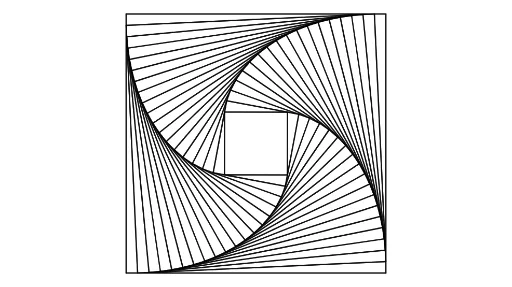
This example demonstrates the pursuit curve in a square, involving concepts of geometric trajectories, function graphs, and coordinate transformations. Construction requires using GeoGebra commands like Polygon, Intersect, and Centroid to build dynamic graphics. Suitable for high school students learning geometric construction and function analysis, useful for math teaching and self-exploration.
GeoGebra Commands & Parameters
Polygon(A, B, 4) → poly1, f, g, h, i, C, DPoint(f) → EIntersect(h, i) → FIntersect(f, g) → GIntersect(f, g) → ICentroid(poly1) → JCircle(A, E) → cRotate(c, 90°, J) → c'Intersect(c', g, 1) → HPolygon(E, H, 4) → poly2, j, k, l, m, K, LCircle(E, A) → dCircle(H, B) → eIntersect(d, j, 1) → MIntersect(e, k, 1) → NPolygon(M, N, 4) → poly3, n, p, q, r, O, PCircle(M, E) → sCircle(N, H) → tIntersect(s, n, 1) → QIntersect(t, p, 1) → RPolygon(Q, R, 4) → poly4, a, b, f_1, g_1, S, TCircle(Q, M) → c_1Circle(R, N) → d_1Intersect(c_1, a, 1) → UIntersect(d_1, b, 1) → VPolygon(U, V, 4) → poly5, h_1, i_1, j_1, k_1, W, ZCircle(U, Q) → e_1Circle(V, R) → p_1Intersect(e_1, h_1, 1) → A_1Intersect(p_1, i_1, 1) → B_1Polygon(A_1, B_1, 4) → poly6, l_1, m_1, n_1, q_1, C_1, D_1Circle(A_1, U) → r_1Circle(B_1, V) → s_1Intersect(r_1, l_1, 1) → E_1Intersect(s_1, m_1, 1) → F_1Polygon(E_1, F_1, 4) → poly7, t_1, a_1, b_1, f_2, G_1, H_1Circle(E_1, A_1) → c_2Circle(F_1, B_1) → d_2Intersect(c_2, t_1, 1) → I_1Intersect(d_2, a_1, 1) → J_1Polygon(I_1, J_1, 4) → poly8, g_2, h_2, i_2, j_2, K_1, L_1Circle(I_1, E_1) → e_2Circle(J_1, F_1) → k_2Intersect(e_2, g_2, 1) → M_1Intersect(k_2, h_2, 1) → N_1Polygon(M_1, N_1, 4) → poly9, l_2, m_2, n_2, p_2, O_1, P_1Circle(M_1, I_1) → q_2Circle(N_1, J_1) → r_2Intersect(q_2, l_2, 1) → Q_1Intersect(r_2, m_2, 1) → R_1Polygon(Q_1, R_1, 4) → poly10, s_2, t_2, a_2, b_2, S_1, T_1Circle(Q_1, M_1) → c_3Circle(R_1, N_1) → d_3Intersect(c_3, s_2, 1) → U_1Intersect(d_3, t_2, 1) → V_1Polygon(U_1, V_1, 4) → poly11, f_3, g_3, h_3, i_3, W_1, Z_1Circle(U_1, Q_1) → e_3Circle(V_1, R_1) → k_3Intersect(e_3, f_3, 1) → A_2Intersect(k_3, g_3, 1) → B_2Polygon(A_2, B_2, 4) → poly12, j_3, l_3, m_3, n_3, C_2, D_2Circle(A_2, U_1) → p_3Circle(B_2, V_1) → q_3Intersect(p_3, j_3, 1) → E_2Intersect(q_3, l_3, 1) → F_2Polygon(E_2, F_2, 4) → poly13, r_3, s_3, t_3, a_3, G_2, H_2Circle(E_2, A_2) → c_4Circle(F_2, B_2) → d_4Intersect(c_4, r_3, 1) → I_2Intersect(d_4, s_3, 1) → J_2Polygon(I_2, J_2, 4) → poly14, b_3, f_4, g_4, h_4, K_2, L_2Circle(I_2, E_2) → e_4Circle(J_2, F_2) → k_4Intersect(e_4, b_3, 1) → M_2Intersect(k_4, f_4, 1) → N_2Polygon(M_2, N_2, 4) → poly15, i_4, j_4, l_4, m_4, O_2, P_2Circle(M_2, I_2) → p_4Circle(N_2, J_2) → q_4Intersect(p_4, i_4, 1) → Q_2Intersect(q_4, j_4, 1) → R_2Polygon(Q_2, R_2, 4) → poly16, n_4, r_4, s_4, t_4, S_2, T_2Circle(Q_2, M_2) → c_5Circle(R_2, N_2) → d_5Intersect(c_5, n_4, 1) → U_2Intersect(d_5, r_4, 1) → V_2Polygon(U_2, V_2, 4) → poly17, a_4, b_4, f_5, g_5, W_2, Z_2Circle(U_2, Q_2) → e_5Circle(V_2, R_2) → h_5Intersect(e_5, a_4, 1) → A_3Intersect(h_5, b_4, 1) → B_3Polygon(A_3, B_3, 4) → poly18, i_5, j_5, k_5, l_5, C_3, D_3Circle(A_3, U_2) → p_5Circle(B_3, V_2) → q_5Intersect(p_5, i_5, 1) → E_3Intersect(q_5, j_5, 1) → F_3Polygon(E_3, F_3, 4) → poly19, m_5, n_5, r_5, s_5, G_3, H_3Circle(E_3, A_3) → t_5Circle(F_3, B_3) → c_6Intersect(t_5, m_5, 1) → I_3Intersect(c_6, n_5, 1) → J_3
AI Drawing Prompt Reference
Draw a square featuring a pursuit curve construction. Begin by creating a square and marking a point on one of its sides. Then, draw a circle centered at that point, intersecting the square's sides to find intersection points, and use these to construct another square. Iterate this process: for each new square, similarly draw circles, locate intersections, and build subsequent squares, forming a sequence that illustrates the trajectory of a moving point. The design incorporates centroid calculations and rotations for added dynamics, showcasing geometric paths and function graphs for math education.
The prompt above was compiled from the original drawing commands and is for reference only.