
Properties of Rectangles, Rhombuses and Squares
Loading the math board and drawing, please wait…
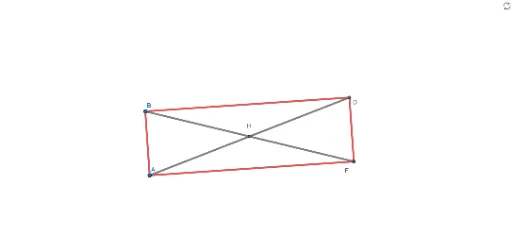
This interactive GeoGebra exploration demonstrates the properties of special quadrilaterals including rectangles, rhombuses, and squares. Students can drag vertices or sides to observe how side lengths, angles, and diagonal relationships change when the quadrilateral is locked into a specific type. Core mathematical concepts include classification of parallelograms, diagonal properties (equal, perpendicular, bisecting), right angles, and symmetry. Construction uses GeoGebra commands such as Line, OrthogonalLine, Circle, Intersect, Segment, and Distance, with objects like A, B, C, D, E, F, G, H and distance variables distanceAD, distanceFB, distanceBF to dynamically measure lengths and verify properties. Suitable for middle school geometry or high school review, this activity helps students discover the distinguishing properties and conditions of rectangles, rhombuses, and squares through hands-on experimentation.
GeoGebra Commands & Parameters
Line(A, B) → fOrthogonalLine(B, f) → gCircle(B, C) → cIntersect(c, g) → D, ESegment(D, B) → hSegment(B, A) → iOrthogonalLine(D, g) → jCircle(A, Radius[c]) → dIntersect(d, j) → F, GSegment(D, F) → kSegment(F, A) → lSegment(A, D) → mSegment(B, F) → nIntersect(n, m) → HDistance(A, D) → distanceADDistance(F, B) → distanceFBDistance(B, F) → distanceBFDistance(A, D) → a
AI Drawing Prompt Reference
Draw a dynamic geometry figure illustrating properties of rectangles, rhombuses, and squares. Start with a horizontal segment. At one endpoint, construct a perpendicular line. Using that endpoint as center and a given length as radius, draw a circle intersecting the perpendicular at two points; choose one intersection and connect it to the other endpoint to form a right angle. Then, through that chosen point, draw another perpendicular to the previous perpendicular, and with the other endpoint as center and the same radius, draw another circle. Connect the intersections of this circle with the new perpendicular to the existing points to form a quadrilateral. Finally, draw the diagonals, mark their intersection, and measure the side lengths to verify properties such as equal, perpendicular, or bisecting diagonals.
The prompt above was compiled from the original drawing commands and is for reference only.