
Properties of Perpendicular Lines to Chords of Circles
Loading the math board and drawing, please wait…
In collections
Unit 9 - Circles
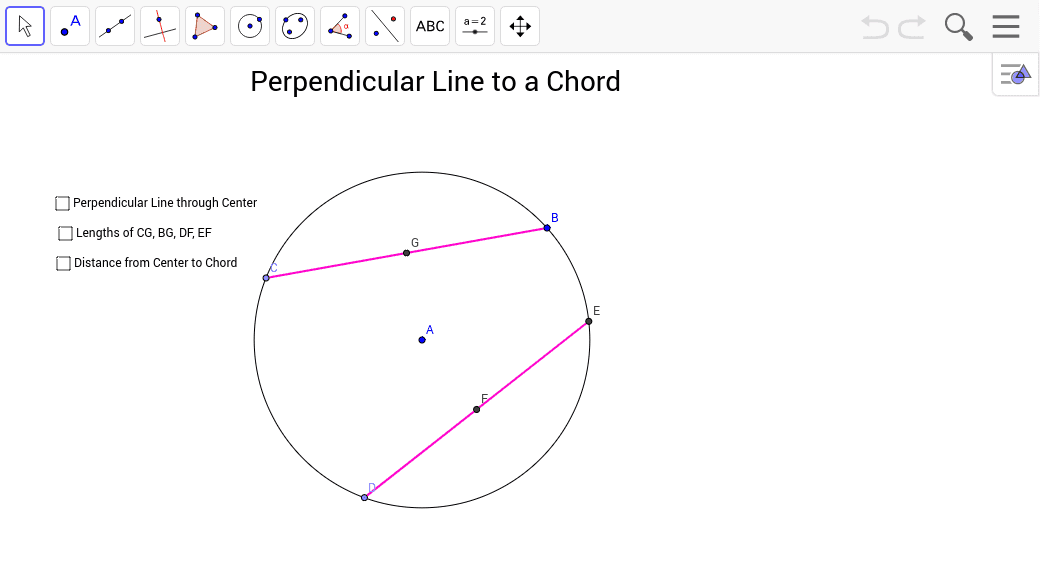
This applet demonstrates the geometric properties of perpendicular lines drawn to chords of circles. It covers core concepts like the perpendicular bisector theorem, central angles, and chord distances. Constructed using GeoGebra commands such as Circle, Point, Segment, Intersect, Angle, OrthogonalLine, and Distance. Ideal for high school students studying circle geometry and properties.
GeoGebra Commands & Parameters
Circle(A, B) → cPoint(c) → CSegment(B, C) → aPoint(c) → DCircle(D, Segment[C, B]) → dIntersect(c, d, 1) → ESegment(A, B) → bSegment(A, C) → eSegment(A, D) → fSegment(A, E) → gSegment(D, E) → hAngle(B, A, C) → αAngle(D, A, E) → βOrthogonalLine(A, a) → iOrthogonalLine(A, h) → jIntersect(j, h) → FIntersect(i, a) → GAngle(A, G, B) → γAngle(A, F, D) → δDistance(C, G) → distanceCGDistance(G, B) → distanceGBDistance(D, F) → distanceDFDistance(E, F) → distanceEFDistance(A, G) → distanceAGDistance(A, F) → distanceAF
AI Drawing Prompt Reference
Draw a circle and a chord inside it. Then, draw a concentric circle with the midpoint of the chord as the center. Find the intersection points of the two circles. Connect the center to these points and draw perpendicular lines to the chord. Measure the chord's length, central angles, and the relationships between the perpendicular segments and the chord, labeling key distances.
The prompt above was compiled from the original drawing commands and is for reference only.