
Properties of Isosceles Triangles Demo by misschen
Loading the math board and drawing, please wait…
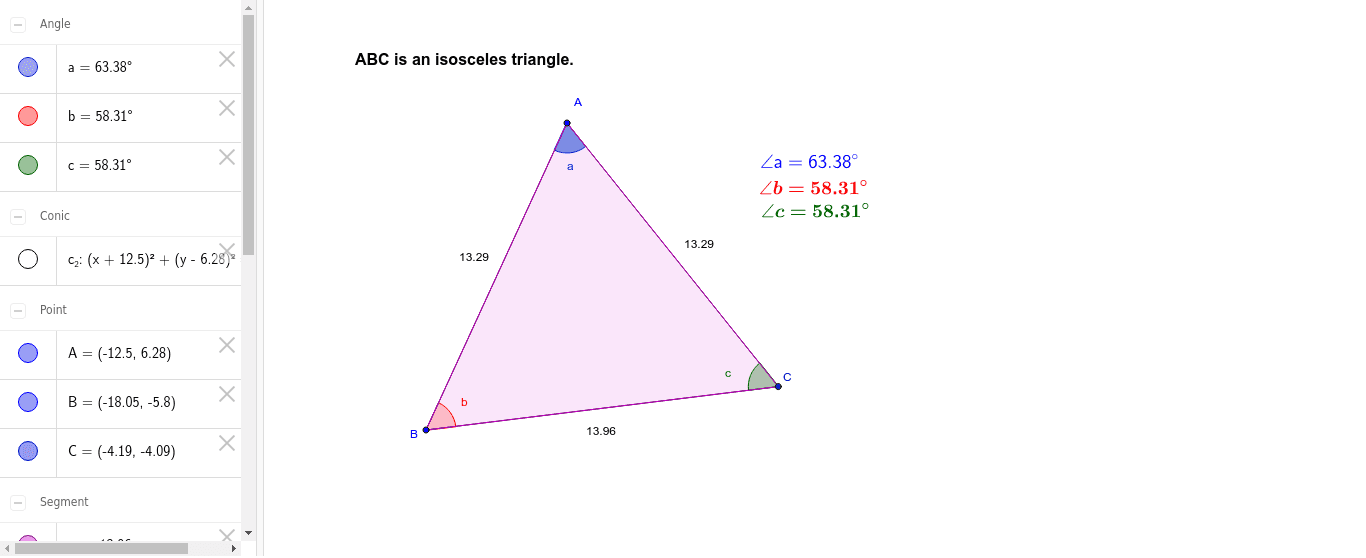
This example dynamically demonstrates the properties of isosceles triangles using GeoGebra, including base angles congruence, the perpendicularity of the angle bisector to the base, and symmetry. Key math concepts involved are the definition of isosceles triangles, congruent triangles, angle bisector properties, and axis symmetry. Construction highlights include commands like Circle, Point, Segment, Polygon, and Angle. Suitable for middle school and high school students learning geometric properties and for classroom demonstrations.
GeoGebra Commands & Parameters
Circle(A, B) → c_2Point(c_2) → CSegment(A, C) → a_2Segment(A, B) → b_2Segment(B, C) → dPolygon(B, A, C) → poly1, c_1, b_1, a_1Angle(C, B, A) → bAngle(A, C, B) → cAngle(B, A, C) → a
AI Drawing Prompt Reference
Draw an isosceles triangle to demonstrate its properties, including congruent base angles, the perpendicularity of the angle bisector to the base, and symmetry. Start by drawing two equal segments as the base, then use the midpoint of the base as the center to draw a circle, connecting the intersection points to form the triangle. Label the base angles and vertex angle, and draw the angle bisector to show its perpendicularity to the base.
The prompt above was compiled from the original drawing commands and is for reference only.