
Properties and Construction of Right Triangles
Loading the math board and drawing, please wait…
In collections
Special Right Triangle (2): Thinking Classroom Exploration
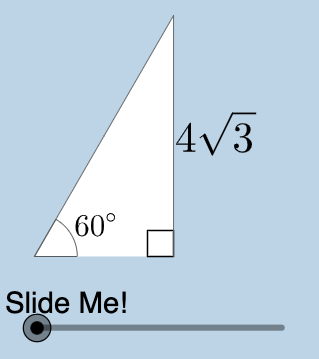
This example demonstrates the properties of right triangles, including the application of the Pythagorean theorem. Using commands like rotation, intersection, and midpoint, it shows the geometric construction methods of triangles. Suitable for middle school and above students to learn geometric construction and trigonometry.
GeoGebra Commands & Parameters
Center(c) → ARotate(B, pi / 3, A) → B'_1Intersect(h, i) → CMidpoint(A, B'_1) → JAngle(B, A, B'_1) → βRotate(B, pi / 4, A) → B'_2Angle(B, A, B'_2) → γIntersect(g, i) → DPolygon(A, D, B'_2) → poly2, b'_2, a_2, dPolygon(A, C, B'_1) → poly3, b'_1, a_3, c_1Dilate(A, If[0 < a ≤ 1, 1 - a, 0], J) → A'_1Segment(A, A'_1) → kDilate(J, If[1 < a ≤ 2, 2 - a, 0], B'_1) → F'CircleArc(A, B'_1, B) → pTextfield(r) → InputBox1Segment(J, F') → mMidpoint(C, B'_1) → KDilate(C, If[0 < a ≤ 1, 1 - a, 0], K) → C'Dilate(K, If[1 < a ≤ 2, 2 - a, 0], B'_1) → K'Segment(C, C') → jSegment(K, K') → lAngle(B'_1, C, A) → αDilate(A, If[2 < a ≤ 3, 3 - a, 0], C) → A'Segment(A, A') → nRotate(A, If[3.5 < a ≤ 4.5, ((a - 3.5) * pi / 3), pi / 3], A) → A'_3Rotate(A', If[3.5 < a ≤ 4.5, ((a - 3.5) * pi / 3), pi / 3], A) → A''Segment(A'_3, A'') → n'Rotate(A'_3, If[4.5 < a ≤ 5.5, ((a - 4.5) * pi), pi], J) → FRotate(A'', If[4.5 < a ≤ 5.5, ((a - 4.5) * pi), pi], J) → A'''Segment(F, A''') → n''CircleArc(A, B, B'_1) → qRotateText(text4, ((-pi)) / 2) → text6Mirror(A, j) → A'_{2}Mirror(C, j) → C'_{1}Mirror(B'_1, j) → EPolygon(A'_{2}, C'_{1}, E) → poly3', e, a'_{2}, c'_{1}Mirror((0, 0), A') → GRotate((0, 0), (-(pi / 3)), G) → HMirror(F, l) → F'_{1}Mirror(A''', l) → ISegment(F'_{1}, I) → n'''Mirror(A'_3, j) → LMirror(A'', j) → A'''_{1}Segment(L, A'''_{1}) → n''_{1}Mirror(A, j) → A'_{4}Mirror(A', j) → A''_{1}Segment(A'_{4}, A''_{1}) → n'_{1}Angle(N, M, (0, 0)) → δ
AI Drawing Prompt Reference
Create an educational diagram demonstrating right triangle properties: start with a center point and draw two rays forming 60° and 45° angles. Connect points on these rays to form triangles and mark the corresponding angles. Construct midpoints of the triangle sides and draw lines through midpoints parallel to sides to create midline segments. Draw circular arcs using the center point passing through relevant points. Introduce a slider parameter that dynamically controls line segment lengths and rotation angles based on parameter value changes. Reflect key points across each side as axes of symmetry and connect them to form symmetric figures. Finally, mark an angle at the origin. The entire graphic demonstrates applications of the Pythagorean theorem and geometric construction methods for triangles.
The prompt above was compiled from the original drawing commands and is for reference only.