
Properties and Construction of Parallelograms
Loading the math board and drawing, please wait…
In collections
Parallelogramm und Raute: Eigenschaften und Konstruktionen
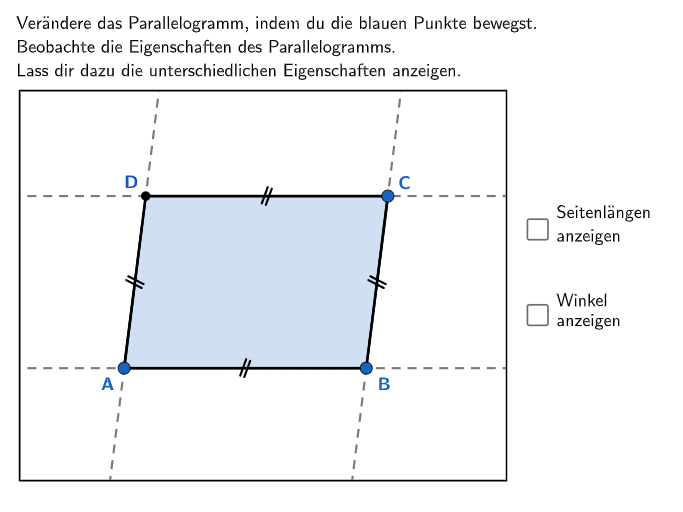
This example illustrates the properties of parallelograms, including the definition of parallel sides and their impact on side lengths and angles. Using GeoGebra commands such as Polygon, Line, Segment, and Rotate, students can understand and verify the properties of parallelograms. Key mathematical concepts include parallel lines, side length relationships, and angle relationships. Suitable for 5-6th grade students to explore the properties of geometric shapes.
GeoGebra Commands & Parameters
Polygon(O4, Midpoint[O3, O4], Midpoint[O2, O4], Midpoint[O1, O4]) → v4, o4, s_1, t_1, a_1Polygon(O3, Midpoint[O3, O2], Midpoint[O2, O4], Midpoint[O3, O4]) → v3, o3, p_1, q_1, r_1Polygon(O2, Midpoint[O3, O2], Midpoint[O2, O4], Midpoint[O1, O2]) → v2, o2, l_1, m_1, n_1Polygon(R1 + (0.2, -0.2), (x(R2), y(R1)) + (-0.2, -0.2), R2 + (-0.2, 0.2), (x(R1), y(R2)) + (0.2, 0.2)) → v02, d, f_1, g_1, h_1Polygon(R1, (x(R2), y(R1)), R2, (x(R1), y(R2))) → v01, q, r, s, tPointIn(v4) → C1PointIn(v2) → A1Polygon(A1 - (100 * UnitVector[Vector[A1, C1]]), A1 + (100 * UnitVector[Vector[A1, C1]]), A1 + (100 * UnitVector[Vector[A1, C1]]) + (100 * UnitOrthogonalVector[Segment[A1, C1]]), A1 - (100 * UnitVector[Vector[A1, C1]]) + (100 * UnitOrthogonalVector[Segment[A1, C1]])) → v0, k, l, m, nSequence(true, m, 1, maxstep) → listfixedTextfield(input1) → Eingabefeld1Textfield(input2) → Eingabefeld2PointIn(v3) → B1Line(A1, B1) → f1Line(C1, D1) → gLine(B1, C1) → hLine(A1, D1) → iLine(A1, C1) → jSegment(A1, C1) → pSegment(A1, B1) → s1Segment(B1, C1) → s2Segment(C1, D1) → s3Segment(D1, A1) → s4Polygon(A1, B1, C1, D1) → l2, l2_{2}, l2_{3}, l2_{4}, l2_{5}If(switch, Angle[D1, A1, B1], Angle[B1, A1, D1]) → αIf(switch, Angle[A1, B1, C1], Angle[C1, B1, A1]) → βIf(switch, Angle[B1, C1, D1], Angle[D1, C1, B1]) → γIf(switch, Angle[C1, D1, A1], Angle[A1, D1, C1]) → δSegment(A1, C1) → eSegment(B1, D1) → fRotate(Sequence[Segment[Midpoint[D1, C1] - (0.2 * UnitOrthogonalVector[Segment[D1, C1]]) + ((o * 0.05) * UnitVector[Vector[D1, C1]]), Midpoint[D1, C1] + (0.2 * UnitOrthogonalVector[Segment[D1, C1]]) + ((o * 0.05) * UnitVector[Vector[D1, C1]])], o, -1, 1, 2], 340°, Midpoint[C1, D1]) → parallels1Rotate(Sequence[Segment[Midpoint[A1, B1] - (0.2 * UnitOrthogonalVector[Segment[A1, B1]]) + ((o * 0.05) * UnitVector[Vector[A1, B1]]), Midpoint[A1, B1] + (0.2 * UnitOrthogonalVector[Segment[A1, B1]]) + ((o * 0.05) * UnitVector[Vector[A1, B1]])], o, -1, 1, 2], 340°, Midpoint[B1, A1]) → parallels2Rotate(Sequence[Segment[Midpoint[C1, B1] - (0.2 * UnitOrthogonalVector[Segment[C1, B1]]) + ((o * 0.05) * UnitVector[Vector[C1, B1]]), Midpoint[C1, B1] + (0.2 * UnitOrthogonalVector[Segment[C1, B1]]) + ((o * 0.05) * UnitVector[Vector[C1, B1]])], o, -1, 1, 2], 340°, Midpoint[B1, C1]) → parallels3Rotate(Sequence[Segment[Midpoint[A1, D1] - (0.2 * UnitOrthogonalVector[Segment[A1, D1]]) + ((o * 0.05) * UnitVector[Vector[A1, D1]]), Midpoint[A1, D1] + (0.2 * UnitOrthogonalVector[Segment[A1, D1]]) + ((o * 0.05) * UnitVector[Vector[A1, D1]])], o, -1, 1, 2], 340°, Midpoint[D1, A1]) → parallels4If(Defined[α], If[α / ° - floor(α / °) < 0.5, floor(α / °), ceil(α / °)], 0) → roundalphaIf(Defined[β], If[β / ° - floor(β / °) < 0.5, floor(β / °), ceil(β / °)], 180) → roundbetaIf(Defined[γ], If[γ / ° - floor(γ / °) < 0.5, floor(γ / °), ceil(γ / °)], 180) → roundgammaIf(Defined[δ], If[δ / ° - floor(δ / °) < 0.5, floor(δ / °), ceil(δ / °)], 0) → rounddeltaPolygon(O1, Midpoint[O1, O2], Midpoint[O2, O4], Midpoint[O1, O4]) → v1, o1, i_1, j_1, k_1
AI Drawing Prompt Reference
Draw a parallelogram and demonstrate its properties. First, create a parallelogram ABCD with opposite sides parallel and equal in length, while adjacent sides are not parallel. Show all four sides AB, BC, CD, and DA, then draw the two diagonals AC and BD which intersect at the center. Label the four interior angles A, B, C, and D. Draw four lines extending from each side, parallel to the opposite side, shown as dashed or lighter lines to illustrate the concept of parallel lines. Optionally label the angle measures to demonstrate that opposite angles are equal and adjacent angles are supplementary. The overall layout should be clear with the parallelogram centered in the figure.
The prompt above was compiled from the original drawing commands and is for reference only.