
Proof Without Words by Cristin Young
Loading the math board and drawing, please wait…
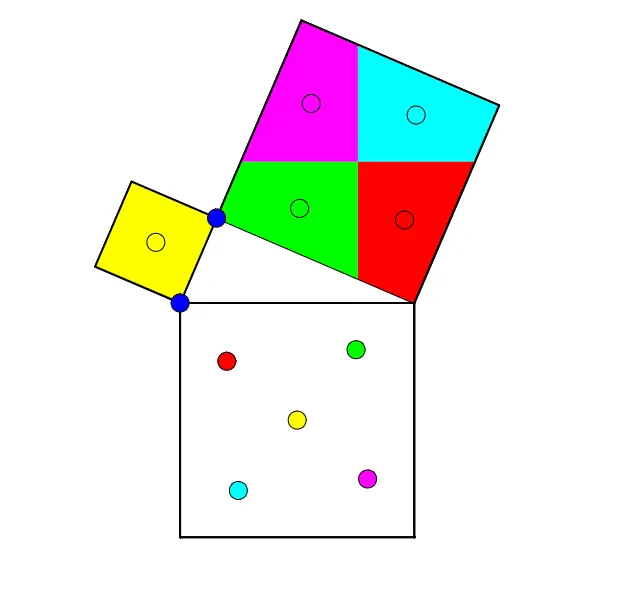
This example demonstrates geometric proof through interactive point dragging. It involves concepts like geometry transformations, triangle properties, and circle properties. Construction uses GeoGebra commands such as Intersect, Point, Ray, Mirror, Semicircle, CircleArc, Segment, Polygon, Midpoint, OrthogonalLine, Vector, Centroid, Translate. Suitable for middle school or high school students for geometry learning, classroom interaction, or self-exploration.
GeoGebra Commands & Parameters
Intersect(xAxis, yAxis) → APoint(xAxis) → BRay(A, B) → aPoint(a) → CMirror(C, A) → C'Semicircle(C, C') → cIntersect(c, yAxis) → D,CircleArc(A, D, C) → dPoint(d) → ESegment(C, E) → bSegment(E, C') → eSegment(C', C) → fPolygon(C', C, 4) → poly1, g, h, i, j, F, GPolygon(C, E, 4) → poly2, k, l, m, n, H, IPolygon(E, C', 4) → poly3, p, q, r, s, J, KMidpoint(E, J) → LOrthogonalLine(L, i) → tOrthogonalLine(L, t) → a_1Intersect(a_1, s) → MIntersect(t, r) → NIntersect(a_1, q) → OIntersect(t, e) → PPolygon(M, L, N, K) → poly4, m_1, l_1, n_1, k_1Polygon(L, N, J, O) → poly5, l_2, n_2, j_1, oPolygon(L, P, C', O) → poly6, l_3, p_1, c', o_1Polygon(P, L, M, E) → poly7, p_2, l_4, m_2, e_1Vector(L, C) → uVector(L, F) → vVector(L, C') → wVector(L, G) → u_1Centroid(poly4) → QCentroid(poly5) → RCentroid(poly6) → SCentroid(poly7) → TTranslate(T, w) → T'Translate(S, u) → S'Translate(R, v) → R'Translate(Q, u_1) → Q'Segment(Q, Q') → b_1Segment(R, R') → c_1Segment(S, S') → d_1Segment(T, T') → f_1Point(b_1) → UPoint(c_1) → VPoint(d_1) → WPoint(f_1) → ZVector(Q, U) → v_1Vector(R, V) → w_1Vector(S, W) → g_1Vector(T, Z) → h_1Translate(L, w_1) → L'Translate(N, w_1) → N'Translate(J, w_1) → J'Translate(O, w_1) → O'Polygon(L', N', J', O') → poly5', l', n', j', o'Translate(M, v_1) → M'Translate(L, v_1) → L'_1Translate(N, v_1) → N'_1Translate(K, v_1) → K'Polygon(M', L'_1, N'_1, K') → poly4', m', l'_1, n'_1, k'Translate(L, g_1) → L'_2Translate(P, g_1) → P'Translate(C', g_1) → C''Translate(O, g_1) → O'_1Polygon(L'_2, P', C'', O'_1) → poly6', l'_2, p', c'', o'_1Translate(P, h_1) → P'_1Translate(L, h_1) → L'_3Translate(M, h_1) → M'_1Translate(E, h_1) → E'Polygon(P'_1, L'_3, M'_1, E') → poly7', p'_1, l'_3, m'_1, e'Midpoint(H, C) → A_1Midpoint(C, G) → B_1Segment(A_1, B_1) → i_1Point(i_1) → C_1Vector(A_1, C_1) → q_1Translate(poly2, q_1) → poly2'
AI Drawing Prompt Reference
This is a geometric proof diagram with a triangle and a circle. The triangle's vertex is dragged, and the circle changes accordingly. The diagram includes symmetric line segments, perpendicular line segments, and multiple triangles. The construction order starts with the triangle, then adds the circle and symmetric line segments, followed by perpendicular line segments and triangles. The diagram is used to demonstrate geometric transformations and triangle properties.
The prompt above was compiled from the original drawing commands and is for reference only.