
Angle Bisector Dynamic Demo: Move Point B to Explore Properties
Loading the math board and drawing, please wait…
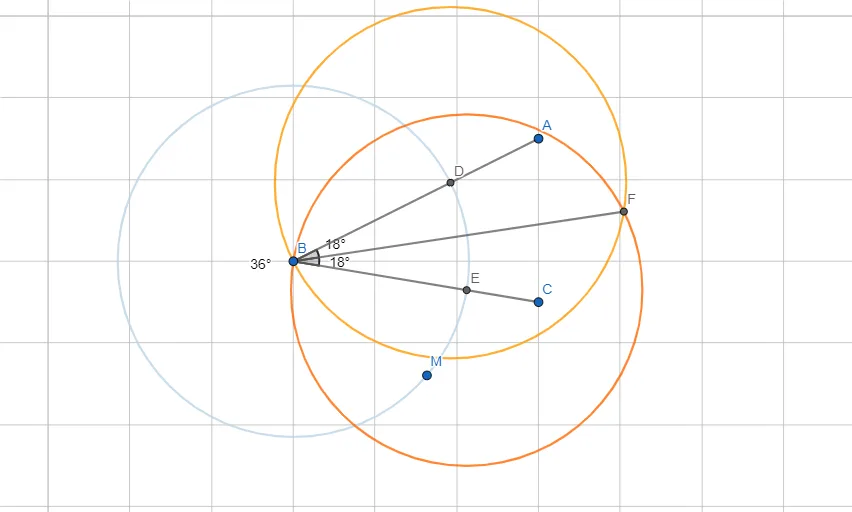
This GeoGebra example demonstrates the construction and properties of an angle bisector in a dynamic triangle. By dragging point B, users can change the triangle's shape and observe how the bisector segments (d, e) and related angles α, β, γ vary, reinforcing the concept that an angle bisector divides an angle into two equal parts and that any point on the bisector is equidistant from the sides of the angle. The construction uses GeoGebra commands such as Segment, Circle, Intersect, and Angle, involving objects like points A, B, C, M, D, E, F, auxiliary circle c, and segments f, g, h. This interactive resource is suitable for middle school geometry lessons, helping students explore the definition, properties, and relationships of angle bisectors within triangles. It can serve as a classroom demonstration tool or a self-guided exploration activity for learners.
GeoGebra Commands & Parameters
Segment(A, B) → fSegment(B, C) → gCircle(B, M) → cIntersect(c, f, 1) → DIntersect(c, g, 1) → ECircle(D, B) → dCircle(E, B) → eAngle(A, B, C) → αIntersect(d, e, 2) → FSegment(B, F) → hAngle(A, B, F) → βAngle(F, B, C) → γ
AI Drawing Prompt Reference
Draw a triangle ABC with point B movable. Draw a circle with center B that intersects sides AB and BC at points D and E, respectively. Draw circles with centers D and E and radius BE, intersecting at point F. Connect BF to form the angle bisector. Observe how angles α, β, and γ change as you move point B, and understand the properties of the angle bisector.
The prompt above was compiled from the original drawing commands and is for reference only.