
Projectile Motion & Parametric Equations
Loading the math board and drawing, please wait…
In collections
Pearson Maths A level Statistics and Mechanics 2
Pearson Maths A level Statistics and Mechanics 2
Pearson Maths A level Statistics and Mechanics 2
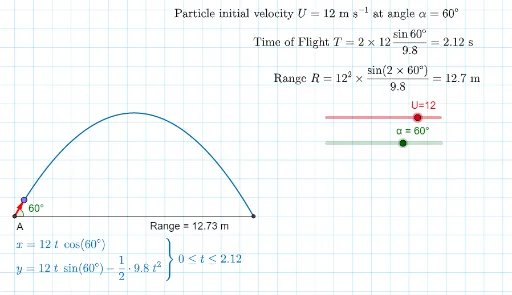
This example demonstrates the trajectory of projectile motion and its parametric equations. Key math concepts include parametric curves, derivatives, expected value, and vector operations. Construction highlights involve commands like Sequence, CurveCartesian, Intersect, Point, Rotate, Angle, Vector, and Segment from GeoGebra, emphasizing parametric representation and geometric constructions. Suitable for high school and above, ideal for learning applications of parametric equations in physics and coordinate geometry techniques.
GeoGebra Commands & Parameters
Sequence(Segment[(-100, i), (100, i)], i, -50, 50, 1) → list2Sequence(Segment[(i, -100), (i, 100)], i, -50, 50, 1) → list4CurveCartesian(((U * t) * cos(α)), ((U * t) * sin(α)) - ((1 / 2 * 9.8) * t^(2)), t, 0, ((2 * U) * sin(α) / 9.8)) → aIntersect(f, a) → B, A_1Point(a) → CPoint(f) → DRotate(D, α, A_1) → D'Angle(D, A_1, D') → βVector(A_1, D') → uSegment(A_1, B) → g
AI Drawing Prompt Reference
Draw a Cartesian coordinate plane with horizontal and vertical grid lines. Plot a parabolic trajectory starting from the origin, rising to the right and falling back to the x-axis. Place a moving point on the trajectory and another point on the x-axis. From the x-axis point, draw a ray making an angle with the x-axis equal to the launch angle at the origin, then rotate this ray to align with the tangent direction of the trajectory at the origin. Draw a vector from the x-axis point along the rotated ray, and connect the x-axis point to the trajectory's endpoint with a segment. Label the start, end, and moving points, and mark the angle between the original and rotated rays.
The prompt above was compiled from the original drawing commands and is for reference only.