
Problem of Mixing - Addition of Solute - Percentage
Loading the math board and drawing, please wait…
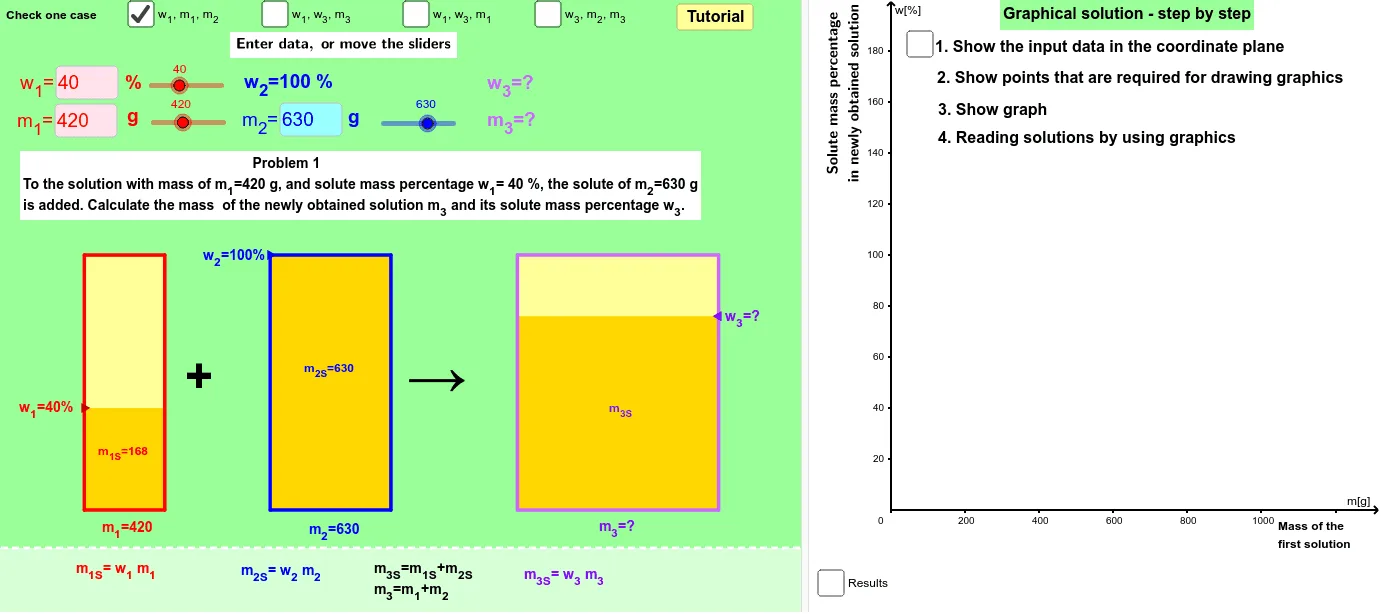
This example demonstrates the process of solving problems involving the addition of solute and percentage in mixtures, visually representing changes in solution proportions through dynamic graphics. Key mathematical concepts include addition, hypergeometric distribution, subtraction, ratios, logarithmic functions, and frequency distribution. The construction utilizes GeoGebra commands such as Ray, OrthogonalLine, Intersect, Line, Textfield, Segment, Midpoint, VerticalText, Min, Max, Sequence, KeepIf, Element, IndexOf, and Polygon. It is suitable for high school students studying probability & statistics and coordinate geometry, helping them understand mixture calculations and visualization.
GeoGebra Commands & Parameters
Ray(A_4, B_4) → lOrthogonalLine(E_4, e_1) → mIntersect(l, m) → C_4Line(A_3, B_3) → fLine(A_2, C_2) → pIntersect(c, f) → C_3Textfield(m_11) → inputBoxm_11Textfield(m_21) → inputBoxm_21Textfield(w_11) → inputBoxw_11Textfield(m_32) → inputBoxm_32Line(A_1, C_1) → bIntersect(a, b) → B_1Segment(E_1, C_1) → b_1Segment(C_1, F_1) → c_1Segment(D_1, B_1) → a_1Segment(B_1, G_1) → d_1Segment(A_1, C_1) → g_1OrthogonalLine(G_2, t) → qIntersect(q, p) → B_2Segment(A_2, C_2) → g_2Segment(G_2, B_2) → d_2Segment(B_2, D_2) → a_2Segment(C_2, E_2) → b_2Segment(C_2, F_2) → c_2Segment(G_3, B_3) → d_3Segment(D_3, B_3) → a_3Line(B_4, C_4) → iSegment(G_4, B_4) → d_4Segment(B_4, D_4) → a_4Segment(F_4, C_4) → c_4Segment(C_4, E_4) → b_4Segment(A_4, C_4) → g_4Midpoint(D_2, E_2) → S_2Midpoint(D_4, E_4) → S_4Textfield(w_12) → inputBoxw_12Textfield(w_13) → inputBoxw_13Textfield(w_33) → inputBoxw_33Textfield(m_13) → inputBoxm_13Textfield(w_32) → inputBoxw_32Textfield(w_34) → inputBoxw_34Textfield(m_34) → inputBoxm_34Midpoint(D_1, E_1) → S_1VerticalText(Oy) → OyvVerticalText(text2) → text3Min(w_13, w_23) → min3Max(w_13, w_23) → max3Sequence((100 * n), n, 0, 200) → list1KeepIf(0 < x ≤ 100, list21) → list31Element(list31, 1) → elem1IndexOf(elem1, list21) → index1Element(list1, index1) → scalePolygon(H_1, I_1, M_1, L_1) → poly1z1, a_5, b_5, c_5, d_5Polygon(H_1, I_1, J_1, K_1) → poly1b1, d, e, j, kMidpoint(D_3, E_3) → S_3Ray(F_3, C_3) → hSegment(A_3, C_3) → g_3Polygon(N_1, O_1, T_1, R_1) → poly1z2, n_1, o_1, t_5, r_5Polygon(N_1, O_1, P_1, Q_1) → poly1b2, n_2, o_2, p_5, q_5Polygon(U_1, V_1, W_1, X_1) → poly1b3, u_5, v_1, w_1, x_1Polygon(U_1, V_1, Z_1, Y_1) → poly1z3, u_6, v_2, z_1, y_1Segment(F_3, C_3) → c_3Segment(C_3, E_3) → b_3Polygon(H_2, I_2, J_2, K_2) → poly2b1, h_2, i_2, j_2, k_5Polygon(N_2, O_2, P_2, Q_2) → poly2b2, n_3, o_3, p_6, q_6Polygon(U_2, V_2, W_2, X_2) → poly2b3, u_7, v_3, w_2, x_2Polygon(H_2, I_2, M_2, L_2) → poly2z1, h_1, i_1, m_2, l_2Polygon(N_2, O_2, T_2, R_2) → poly2z2, n_4, o_4, t_6, r_6Polygon(U_2, V_2, Z_2, Y_2) → poly2z3, u_8, v_4, z_2, y_2Polygon(H_3, I_3, J_3, K_3) → poly3b1, h_3, i_3, j_3, k_6Polygon(N_3, O_3, P_3, Q_3) → poly3b2, n_5, o_5, p_7, q_7Polygon(U_3, V_3, W_3, X_3) → poly3b3, u_9, v_5, w_3, x_3Polygon(H_3, I_3, M_3, L_3) → poly3z1, h_4, i_4, m_1, l_3Polygon(N_3, O_3, T_3, R_3) → poly3z2, n_6, o_6, t_7, r_7Polygon(Y_3, U_3, V_3, Z_3) → poly3z3, y_3, u_{10}, v_6, z_3Polygon(H_4, I_4, J_4, K_4) → poly4b1, h_5, i_5, j_4, k_7Polygon(N_4, O_4, P_4, Q_4) → poly4b2, n_7, o_7, p_8, q_8Polygon(U_4, V_4, W_4, X_4) → poly4b3, u_{11}, v_7, w_4, x_4Polygon(H_4, I_4, M_4, L_4) → poly4z1, h_6, i_6, m_4, l_4Polygon(N_4, O_4, T_4, R_4) → poly4z2, n_8, o_8, t_8, r_8Polygon(U_4, V_4, Z_4, Y_4) → poly4z3, u_{12}, v_8, z_4, y_4Textfield(m_24) → inputBoxm_24Ray(E_4, C_4) → nOrthogonalLine(F_2, t) → g
AI Drawing Prompt Reference
Draw a mixture problem diagram with two containers A and B, showing the transfer of solution between them. Container A initially contains a certain amount of solution, and the amount of solute added can be adjusted using a slider. Observe the changes in solution proportions as the solution is transferred from A to B, with text boxes displaying the proportion changes.
The prompt above was compiled from the original drawing commands and is for reference only.