
Probability: Selecting Balls (Interactive Random Draw)
Loading the math board and drawing, please wait…
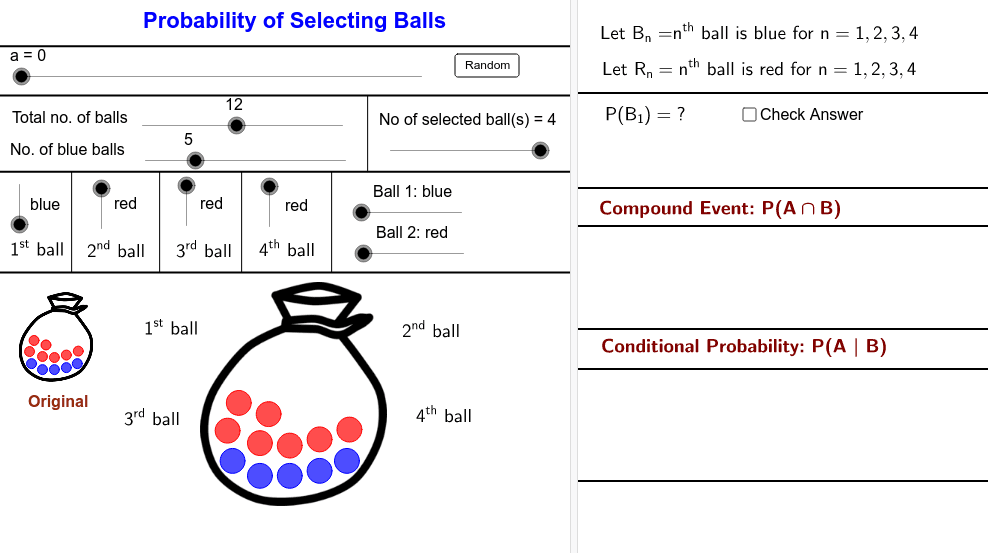
① This example demonstrates the process of randomly drawing red and blue balls without replacement, visualizing classical probability calculations. ② Core math concepts include probability, random events, combinatorial counting, and conditional probability, with auxiliary use of logarithms and quadratic equations. ③ Construction highlights: GeoGebra commands such as Sequence, Shuffle, If, Point, and Segment are used to generate random ball sequences and draw spheres/segments; sliders (NoB, NoS) control the number of balls and draws, and a button (button1) triggers re-randomization for interactive exploration. ④ Suitable for middle school probability lessons and introductory college statistics, helping students grasp the relationship between randomness and empirical frequency.
GeoGebra Commands & Parameters
Sequence(Circle[Element[Centre00, i], BallRadius], i, 2, NoB + 1) → BallBlueList01Sequence(Circle[Element[Centre00, i], BallRadius], i, NoB + 2, nb + 1) → BallRedList01Sequence(i, i, 2, NoB + 1) → BlueListSequence(i, i, NoB + 2, nb + 1) → RedListShuffle(BlueList) → BlueRandomListShuffle(RedList) → RedRandomListSequence(If[Element[SelectedColourNoList, i] ≟ 1, Element[BlueRandomList, i], Element[RedRandomList, i]], i, 1, NoS) → SelectNoListSequence(Circle[Element[Centre001, i], BallRadiusSmall], i, 2, NoB + 1) → BallBlueList001Sequence(Circle[Element[Centre001, i], BallRadiusSmall], i, NoB + 2, nb + 1) → BallRedList001Sequence(Element[Centre00, Element[SelectNoList, i]], i, 1, NoS) → MoveStartIf(a < 5, Element[MoveStart, 1], If[a > 15, C01, (FindCor(a, 5, 15, x(Element[MoveStart, 1]), x(C01)), FindCor(a, 5, 15, y(Element[MoveStart, 1]), y(C01)))]) → C01MoveIf(a < 25, Element[MoveStart, 2], If[a > 35, C02, (FindCor(a, 25, 35, x(Element[MoveStart, 2]), x(C02)), FindCor(a, 25, 35, y(Element[MoveStart, 2]), y(C02)))]) → C02MoveIf(a < 45, Element[MoveStart, 3], If[a > 55, C03, (FindCor(a, 45, 55, x(Element[MoveStart, 3]), x(C03)), FindCor(a, 45, 55, y(Element[MoveStart, 3]), y(C03)))]) → C03MoveIf(a < 65, Element[MoveStart, 4], If[a > 75, C04, (FindCor(a, 65, 75, x(Element[MoveStart, 4]), x(C04)), FindCor(a, 65, 75, y(Element[MoveStart, 4]), y(C04)))]) → C04MoveSequence(If[Element[SelectedColourNoList, i] ≟ 1, Circle[Element[MoveCentre, i], BallRadius]], i, 1, NoS) → BallBlueSelectedListSequence(If[Element[SelectedColourNoList, i] ≟ 2, Circle[Element[MoveCentre, i], BallRadius]], i, 1, NoS) → BallRedSelectedListSequence(Circle[Element[MoveStart, i], (Lfactor * BallRadius)], i, 1, NoS) → WhiteCircleListIf(Ball01 ≟ 1, NoOfBlue00 - 1, NoOfBlue00) → NoOfBlue01If(Ball02 ≟ 1, NoOfBlue01 - 1, NoOfBlue01) → NoOfBlue02If(Ball03 ≟ 1, NoOfBlue02 - 1, NoOfBlue02) → NoOfBlue03If(Ball04 ≟ 1, NoOfBlue03 - 1, NoOfBlue03) → NoOfBlue04If(Ball01 ≟ 2, NoOfRed00 - 1, NoOfRed00) → NoOfRed01If(Ball02 ≟ 2, NoOfRed01 - 1, NoOfRed01) → NoOfRed02If(Ball03 ≟ 2, NoOfRed02 - 1, NoOfRed02) → NoOfRed03If(Ball04 ≟ 2, NoOfRed03 - 1, NoOfRed03) → NoOfRed04Sequence(If[Element[SelectedColourNoList, i] ≟ 1, Element[NoOfBlue, i], Element[NoOfRed, i]], i, 1, NoS + 1) → NoOfBallNumeratorPoint(d) → Z06Point(c) → Z05Segment(Z05, Y05) → mSegment(Z06, Y06) → kPoint(d) → Z07Point(d) → Z08Point(d) → Z09Segment(Z07, Y07) → nSegment(Z08, Y08) → pSegment(Z09, Y09) → q
AI Drawing Prompt Reference
Create an interactive probability visualization showing two rows of balls at the top, one blue and one red, with counts controlled by sliders. Below, a draw area randomly selects a few balls without replacement; selected balls move from the top to the bottom and appear as white circles. Include segments indicating the movement paths and dynamic ball positions, along with numbers showing remaining blue and red counts. The layout should clearly illustrate how color proportions change during random draws.
The prompt above was compiled from the original drawing commands and is for reference only.