
Prime Factorization with Tree Diagrams
Loading the math board and drawing, please wait…
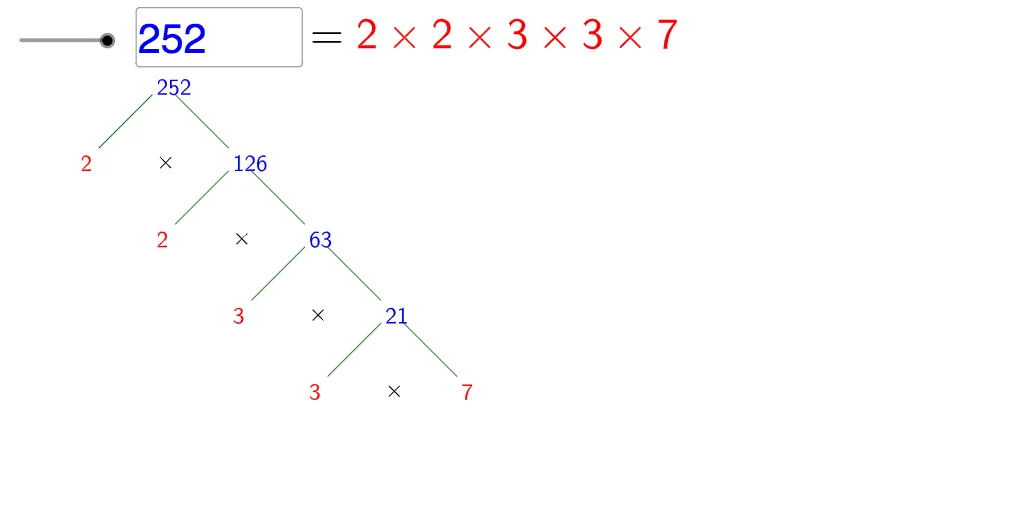
This example demonstrates prime factorization using tree diagrams. It involves core math concepts like prime factorization, tree diagrams, and algebraic operations. The construction uses GeoGebra commands such as Factors, Join, Vector, Textfield, Sequence, Mirror, IsPrime, and Text. It is suitable for middle school students and above learning prime factorization and algebra basics, or for educational demonstrations.
GeoGebra Commands & Parameters
Factors(n) → fmJoin(Sequence[Sequence[Element[Element[fm, i], 1], j, 1, Element[Element[fm, i], 2]], i, 1, Length[fm]]) → factorsVector(VVP) → vuTextfield(n) → inputBox1Vector(VP) → uSequence(ANC + (i * u), i, 0, Length[factors] - 1) → list2Sequence(Product[Sequence[Element[factors, j], j, i, Length[factors]]], i, 1, Length[factors]) → list1Mirror(u, x = 0) → u2Sequence(Element[list2, i] + u2, i, 1, Length[list2] - 1) → list3Sequence(Text["\" + (If[i ≟ Length[list1], "red", "blue"]) + "{" + (Element[list1, i]) + "}", Element[list2, i], false, true], i, 1, len) → list4Sequence(Text["\red{" + (Element[factors, i]) + "}", Element[list3, i], false, true], i, 1, len - 1) → list5Sequence(Segment[Element[list2, i] + hv, Element[list2, i + 1]], i, 1, len - 1) → list6Sequence(Segment[Element[list2, i] + hvu, Element[list3, i] + wu], i, 1, len - 1) → list7Sequence(Text["\times", Element[list2, i] + vu, false, true], i, 1, len - 1) → list8IsPrime(n) → ipText(If[ip, "\ Is\ Prime!", "=\red{" + (Sum[Sequence[If[i ≟ 1, "", "\times"] + (Element[factors, i]), i, 1, Length[factors]]]) + "}"], B, false, true) → text1
AI Drawing Prompt Reference
Draw a prime factorization tree diagram. Input a positive integer n, find all its prime factors, and then display these factors in a tree structure showing their multiplication relationships. Start from the root node and connect each factor node sequentially, finally showing the product expression of the factors.
The prompt above was compiled from the original drawing commands and is for reference only.