
Practice Transformations Parameters: Interactive Function & Vector Transformatio
Loading the math board and drawing, please wait…
In collections
Grade 12 PreCalculus BC
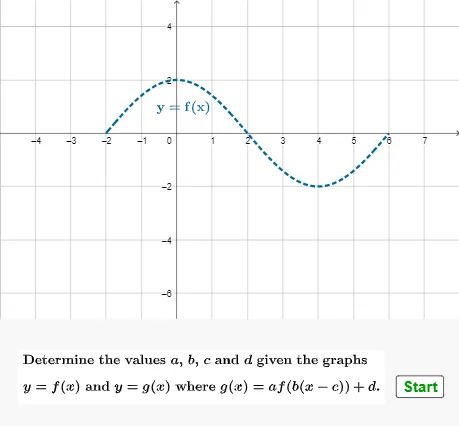
This GeoGebra example is an interactive drill for practicing transformation parameters of functions and vectors. It randomly generates functions (including linear and trigonometric) with transformation parameters (shifts, stretches, reflections) and asks the user to input the correct parameter values into text fields, with automatic validation and scoring. Core mathematical concepts include function graph transformations (translation, scaling, reflection) and parameter representation of 2D/3D vectors. Construction highlights: Random and RandomElement commands generate parameter lists (alist, blist, etc.), If/Min/Max control ranges, Textfield and InputBox create input fields, AreEqual checks answers, and screen objects (screen, score, att) provide interactive feedback. Suitable for high school or early college students to self-practice function transformations, and useful for teachers as a classroom demonstration or quiz tool.
GeoGebra Commands & Parameters
Random(-10, 10) → dRandomElement(alist) → aIf(qQ ≟ 4, 0, d) → dDIf(qQ ≟ 1 ∨ qQ ≟ 3, 1, a) → aARandom(-5, 8) → cIf(qQ ≟ 2 ∨ qQ ≟ 3 ∨ qQ ≟ 4, 0, c) → cCRandomElement(blist) → bIf(qQ ≟ 1 ∨ qQ ≟ 2 ∨ qQ ≟ 5, 1, If[qQ ≟ 6, abs(b), b]) → bBIf(bB > 0, -2 / bB + cC, 6 / bB + cC) → domleftIf(bB > 0, 6 / bB + cC, -2 / bB + cC) → domrightIf(dD < 0, (-2 * abs(aA)) + dD - 5, (-2 * abs(aA)) - 5) → ymin1If(dD < 0, (2 * abs(aA)) + 3, (2 * abs(aA)) + dD + 3) → ymaxMin({domleft - 2, -5}) → xminMax({domright + 2, 8}) → xmaxTextfield(sta) → InputBox1Textfield(stb) → InputBox2Textfield(stc) → InputBox3Textfield(std) → InputBox4AreEqual(InputBox1, aA) → corraAreEqual(InputBox2, bB) → corrbAreEqual(InputBox3, cC) → corrcAreEqual(InputBox4, dD) → corrdIf(qQ ≟ 1, q1text, If[qQ ≟ 2, q2text, If[qQ ≟ 3, q3text, If[qQ ≟ 4, q4text, If[qQ ≟ 5, q5text, q6text]]]]) → qtext
AI Drawing Prompt Reference
Draw a function graph with transformations including translation, scaling, and reflection, featuring both a linear function and a trigonometric function. Input the transformation parameters: translation a, scaling factor b, reflection direction c, and overall translation d. The graph will update automatically based on your input to verify the correctness of the parameters.
The prompt above was compiled from the original drawing commands and is for reference only.