
Practice: Standard Derivative Example 2
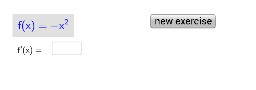
Loading the math board and drawing, please wait…
This interactive GeoGebra exercise lets students practice computing derivatives of polynomial functions through randomly generated examples. It reinforces key calculus concepts such as the definition of a derivative, the power rule, and the derivative of trigonometric functions like sine. The construction uses GeoGebra commands like Random, Shuffle, Polynomial, Textfield, Segment, Derivative, and If, with objects such as knop1, lijsta, a, b, c, etc., to create dynamic function input and instant derivative calculation. Ideal for high‑school or early university calculus students as a classroom drill or self‑study tool.
GeoGebra Commands & Parameters
Shuffle({-6, -5, -4, -3, -2, -1, 1, 2, 3, 4, 5, 6}) → lijstaElement(lijsta, 2) → bElement(lijsta, 1) → aRandom(-8, 8) → cPolynomial((a * x^(2))) → fRandom(0, 4) → lRandom(l + 1, 5) → rTextfield(leegt) → tekstveld1Textfield(leegn) → tekstveld2Segment(A, B) → dDerivative(f) → gTextfield(leeg) → tekstveld3If(ant ≟ g, "CORRECT!", "Try again!") → controle
AI Drawing Prompt Reference
Please create an interactive exercise diagram to help students compute derivatives of polynomial functions through randomly generated examples. The diagram should include a randomly generated quadratic polynomial function, its derivative, and text fields for input and displaying results. First, generate a random quadratic polynomial function, then calculate and display its derivative. Students can enter their answers in the text field, and the system will provide feedback based on whether the answer is correct.
The prompt above was compiled from the original drawing commands and is for reference only.