
Practice: Multiplying Powers of Ten with Visual Functions
Loading the math board and drawing, please wait…
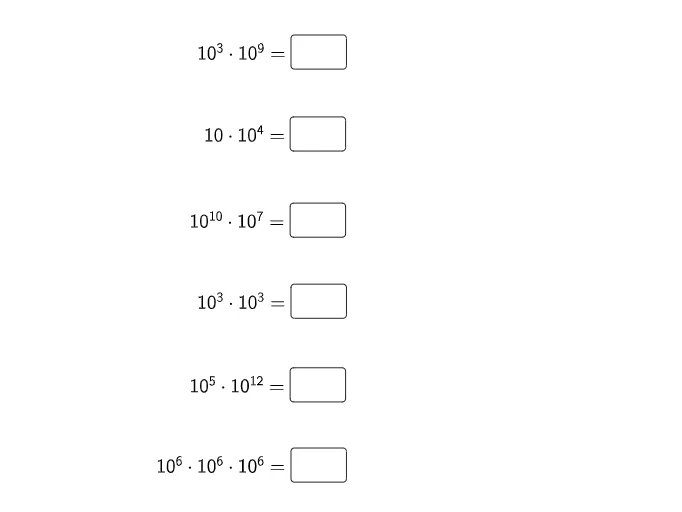
This GeoGebra example demonstrates how multiplying powers of ten follows the exponent rule and how to reinforce that idea using visual, interactive function-style inputs. The central concepts are exponents (powers of 10), the multiplication law a^m · a^n = a^(m+n), and the mapping between algebraic exponent operations and corresponding numeric/graph behavior. Construction-wise, the dynamic setup uses GeoGebra Textfield objects to display or compute multiple function-related items (f1–f6) and several InputBoxes (InputBox1, InputBox3, InputBox5, InputBox7, InputBox9, InputBox11). By changing the input parameters, learners can immediately see how the product of powers updates the results and how the associated curve/function representation responds. Suitable for middle school through high school, especially for practice and conceptual understanding during lessons on exponents and exponential/graphing interpretation.
GeoGebra Commands & Parameters
Textfield(f1) → InputBox1Textfield(f2) → InputBox3Textfield(f3) → InputBox5Textfield(f4) → InputBox7Textfield(f5) → InputBox9Textfield(f6) → InputBox11
AI Drawing Prompt Reference
Draw a graphic that illustrates the concept of exponent multiplication. The graphic should include multiple function curves, such as exponential functions and curves representing multiplication results, along with input boxes and text boxes to display and compute different exponent values. By adjusting the input parameters, observe how the curves change to intuitively understand the rule of exponent multiplication.
The prompt above was compiled from the original drawing commands and is for reference only.