
Positioning Fractions on the Number Line
Loading the math board and drawing, please wait…
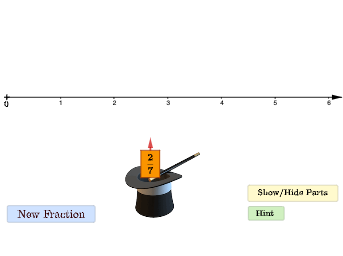
This applet is designed as a game to help young students understand how to position fractions on the number line. Key math concepts include fractions. The construction uses commands like Random, Corner, Polygon, Midpoint, Sequence, and Vector in GeoGebra. Suitable for upper elementary or lower middle school students.
GeoGebra Commands & Parameters
Random(1, 6) → aaRandom(1, 9) → bbCorner(5) → dimsPolygon(Corner[frac, 1], Corner[frac, 2], Corner[frac, 3], Corner[frac, 4]) → q1, f, g, h, iMidpoint(h) → MMSequence((0, 0) + (i / bb, 0), i, 0, (bb * 10)) → parts, {(0, 0), (0.14285714285714285, 0), (0.2857142857142857, 0), (0.42857142857142855, 0), (0.5714285714285714, 0), (0.7142857142857143, 0), (0.8571428571428571, 0), (1, 0), (1.1428571428571428, 0), (1.2857142857142858, 0), (1.4285714285714286, 0), (1.5714285714285714, 0), (1.7142857142857142, 0), (1.8571428571428572, 0), (2, 0), (2.142857142857143, 0), (2.2857142857142856, 0), (2.4285714285714284, 0), (2.5714285714285716, 0), (2.7142857142857144, 0), (2.857142857142857, 0), (3, 0), (3.142857142857143, 0), (3.2857142857142856, 0), (3.4285714285714284, 0), (3.5714285714285716, 0), (3.7142857142857144, 0), (3.857142857142857, 0), (4, 0), (4.142857142857143, 0), (4.285714285714286, 0), (4.428571428571429, 0), (4.571428571428571, 0), (4.714285714285714, 0), (4.857142857142857, 0), (5, 0), (5.142857142857143, 0), (5.285714285714286, 0), (5.428571428571429, 0), (5.571428571428571, 0), (5.714285714285714, 0), (5.857142857142857, 0), (6, 0), (6.142857142857143, 0), (6.285714285714286, 0), (6.428571428571429, 0), (6.571428571428571, 0), (6.714285714285714, 0), (6.857142857142857, 0), (7, 0), (7.142857142857143, 0), (7.285714285714286, 0), (7.428571428571429, 0), (7.571428571428571, 0), (7.714285714285714, 0), (7.857142857142857, 0), (8, 0), (8.142857142857142, 0), (8.285714285714286, 0), (8.428571428571429, 0), (8.571428571428571, 0), (8.714285714285714, 0), (8.857142857142858, 0), (9, 0), (9.142857142857142, 0), (9.285714285714286, 0), (9.428571428571429, 0), (9.571428571428571, 0), (9.714285714285714, 0), (9.857142857142858, 0), (10, 0)}Polygon(A + (NumSq - 1, 0), A + (NumSq, 0), A + (NumSq, -1), A + (NumSq - 1, -1)) → last, j, k, l, mSequence(Polygon[A + (i / bb, 0), A + ((i + 1) / bb, 0), A + ((i + 1) / bb, -1), A + (i / bb, -1)], i, 0, aa - 1) → l1, {0.14285714285714285, 0.14285714285714288}Sequence(Polygon[A, A + (i, 0), A + (i, -1), A + (0, -1)], i, 1, NumSq - 1) → wholes, {}Sequence(Segment[A + (i / bb, 0), A + (i / bb, -1)], i, 0, (bb * NumSq) - 1) → segments, {1, 1, 1, 1, 1, 1, 1}Sequence(Segment[A + (i / bb, -1), A + (i / bb, -1.5)], i, 0, aa) → connecting, {0.5, 0.5, 0.5}Vector(MM, (x(MM), y(MM) + 0.24)) → uPolygon(H, H + (0.35, 0), H + (0.35, 0.51), H + (0, 0.51)) → A2q2, n, p, q, r
AI Drawing Prompt Reference
Draw a number line from 0 to 10 with marks every 1/7. Mark a fraction, like 1/7, on the number line. Then draw an upward arrow with its tip 0.24 units away from the mark. Finally, draw a rectangle to represent the fraction 1/7.
The prompt above was compiled from the original drawing commands and is for reference only.