
Polynomial Function Exploration
Loading the math board and drawing, please wait…
In collections
geometriadinamica.es
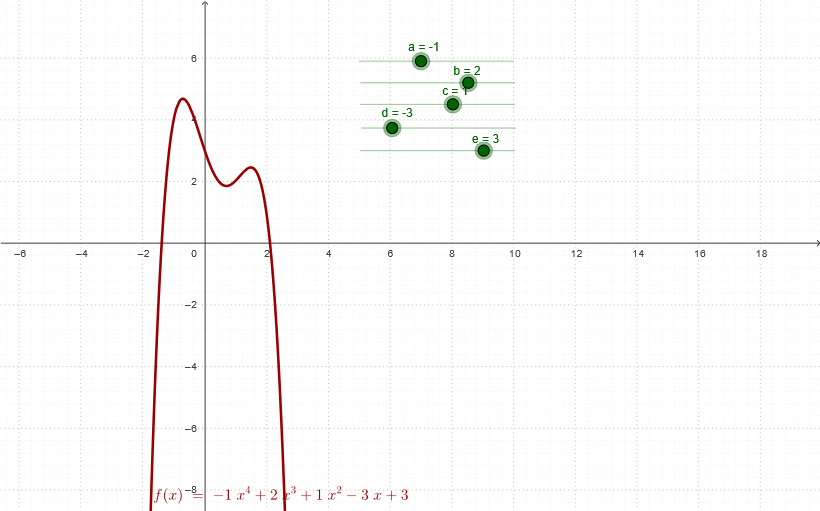
①This example demonstrates the graph of a polynomial function and its key properties, allowing users to observe how the shape changes by adjusting coefficients. ②Core mathematical concepts include the degree, coefficients, zeros, extrema, symmetry, and monotonicity of polynomial functions. ③Construction highlights: from the summary, objects d, c, b, e, a are likely coefficients or parameters, T1, T3, T4 may be auxiliary points or labels, and f is the final polynomial function graph, created using GeoGebra's algebra and graphics views. ④Suitable for high school students learning functions and graphs, or for pre-calculus review, providing an intuitive understanding of how coefficients affect the behavior of polynomial functions.
GeoGebra Commands & Parameters
Numeric d(-3)Numeric c(1)Numeric b(2)Numeric e(3)Numeric a(-1)f(x) = (a * x^(4)) + (b * x^(3)) + (c * x^(2)) + (d * x) + e
AI Drawing Prompt Reference
Draw a graph of a quartic polynomial function. The graph should include a function curve determined by coefficients a, b, c, d, and e. The curve should display the basic shape of the polynomial function, such as a parabola or a more complex curve. Users can observe changes in the curve by adjusting the coefficients. The graph should clearly show zeros, extrema, and symmetry of the function. Ensure the graph is clear and easy to understand the properties of polynomial functions.
The prompt above was compiled from the original drawing commands and is for reference only.