
Polynomial Division and Function Graph Analysis
Loading the math board and drawing, please wait…
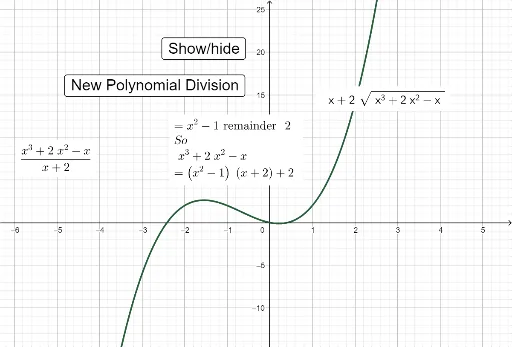
This example demonstrates polynomial division operations and the generation of function graphs. Key mathematical concepts include polynomial division, function graph transformations, and coordinate geometry. Construction involves using GeoGebra commands like Random, Expand, and Factor to create polynomial objects, and applying coordinate transformations to display division results. Suitable for high school students or college undergraduates learning polynomial operations and function graph analysis.
GeoGebra Commands & Parameters
Random(0, 1) → C1Random(0, 1) → C5Random(0, 1) → C2Random(0, 1) → C4Random(0, 1) → C6Random(0, 1) → C7Random(0, 1) → C8Random(0, 1) → C9Random(0, 1) → C10Random(0, 1) → C11Random(0, 1) → C12Random(0, 1) → C13Random(0, 1) → C14Random(0, 1) → C15Random(-4, 4) → A1Random(-4, 4) → A2Random(-4, 4) → A3Random(-4, 4) → A4Random(-4, 4) → A5Random(-4, 4) → A6Random(-4, 4) → A7Random(-4, 4) → A8Random(-4, 4) → A9Random(-4, 4) → A10Random(-4, 4) → A11Random(-4, 4) → A12Random(-4, 4) → A13Random(-4, 4) → A14Random(-4, 4) → A15Expand(f) → gExpand(((x - r(2)) * (x - r(3)))) → qFactor(q) → j
AI Drawing Prompt Reference
Create a graph of polynomial division, including two polynomials f and q, as well as their expanded forms g and j. First, randomly generate the coefficients of polynomial f, then create polynomial q, and finally compute its expanded form g and factored form j.
The prompt above was compiled from the original drawing commands and is for reference only.