
Polygon Flower via Circumcircle Arcs
Loading the math board and drawing, please wait…
In collections
Flowers and Polygons -IT
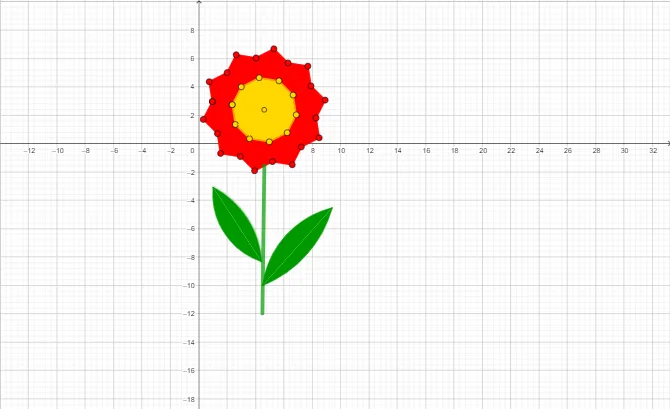
This example demonstrates how to construct a “polygon flower” using geometric constraints based on circles and polygon structure, producing a symmetric, repeating decorative pattern. The key math ideas include polygon vertex construction and perimeter-related interpretation, circle geometry (especially using circumcircle arcs), and the symmetry/repeated structure that can be achieved through similarity-style placement of edges around a central point. From the construction summary, it is built with GeoGebra commands such as Polygon to create multiple polygon parts, Centroid to locate the center used to organize the pattern, Point and Segment to define and connect control vertices, and CircumcircleArc to generate arc-shaped boundaries on circumcircles that form the petal-like edges. The construction involves many labeled objects (e.g., poly1–poly5 along with multiple point sets) that collectively define the flower’s layered polygonal arcs around the central configuration. Suitable for middle school through early university geometry construction, especially for lessons on geometric constructions, symmetry/transformations, and circle–polygon relationships.
GeoGebra Commands & Parameters
Polygon(E, F, 5) → poly2, j, k, l, m, n, G, H, IPolygon(H, G, 5) → poly1, f, g, h, i, p, A, B, CPolygon(B, A, 5) → poly3, q, r, s, t, a, D, J, KPolygon(J, D, 5) → poly4, b, c, d, e, f_1, L, M, NPolygon(M, L, 5) → poly5, g_1, h_1, i_1, j_1, k_1, O, P, QPolygon(P, O, 5) → poly6, l_1, m_1, n_1, p_1, q_1, R, S, TPolygon(S, R, 5) → poly7, r_1, s_1, t_1, a_1, b_1, U, V, WPolygon(V, U, 5) → poly8, c_1, d_1, e_1, f_2, g_2, Z, A_1, B_1Polygon(A_1, Z, 5) → poly9, h_2, i_2, j_2, k_2, l_2, C_1, D_1, E_1Polygon(F, E, 5) → poly10, m_2, n_2, p_2, q_2, r_2, F_1, G_1, H_1Polygon(F, C_1, Z, U, R, O, L, D, A, G) → poly11, f_3, g_3, s_2, z_1, u, r_3, o, l_3, d_2, a_2Centroid(poly11) → I_1Point(b_1) → K_1Segment(K_1, L_1) → t_2Point(t_2) → M_1CircumcircleArc(M_1, N_1, O_1) → c_2CircumcircleArc(O_1, P_1, M_1) → e_2CircumcircleArc(Q_1, R_1, S_1) → c_3CircumcircleArc(S_1, T_1, Q_1) → d_3
AI Drawing Prompt Reference
Draw a flower-like pattern composed of nested regular pentagons rotating inward. Start with an outer pentagon, then construct successive pentagons using adjacent vertices as starting points, each rotated and scaled down toward a common centroid. Replace some straight edges with circular arcs passing through three key points on the circumcircle, creating petal-shaped curved boundaries. The arcs connect vertices of adjacent pentagons and the center, producing a symmetric, layered decorative design with precise geometric structure.
The prompt above was compiled from the original drawing commands and is for reference only.