
Polygon Dilation Transformation: Scaling Equilateral Triangles and Trapezoids
Loading the math board and drawing, please wait…
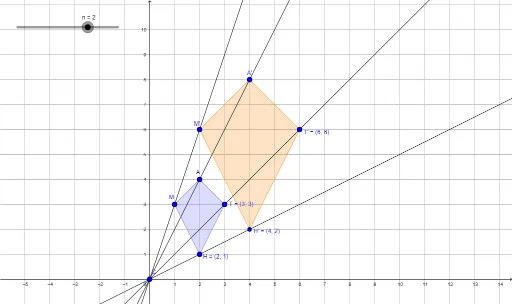
This GeoGebra example demonstrates the dilation (scaling) transformation of polygons. Using equilateral triangles and trapezoids as working examples, it shows how to proportionally enlarge or reduce geometric figures around a center point with a given scale factor. Key mathematical concepts include geometric dilation, similarity, and proportional relationships. Construction highlights: Polygon command creates original shapes, Dilate command performs the scaling transformation, Line command draws auxiliary lines, and corresponding points (M→M', H→H', T→T', A→A') visualize the transformation pattern. Suitable for middle school 'Transformations' units and high school geometry lessons on similarity transformations.
GeoGebra Commands & Parameters
Polygon(M, H, T, A) → poly1, a, b, c, dDilate(M, n, C) → M'Dilate(H, n, C) → H'Dilate(T, n, C) → T'Dilate(A, n, C) → A'Polygon(M', H', T', A') → poly1', m', h', t', a'Line(M, M') → eLine(A, A') → fLine(T, T') → gLine(H, H') → h
AI Drawing Prompt Reference
Draw a quadrilateral whose vertices form a combination of an equilateral triangle and a trapezoid. Choose an external point as the center of scaling, and scale each vertex of the quadrilateral by a given factor to obtain a new quadrilateral. Connect each original vertex to its scaled counterpart with straight lines, all passing through the scaling center, to visualize the dilation transformation. The original and scaled shapes remain similar, with corresponding sides parallel, showing a central projection effect.
The prompt above was compiled from the original drawing commands and is for reference only.