
Polar and Rectangular Coordinates Interactive Applet
Loading the math board and drawing, please wait…
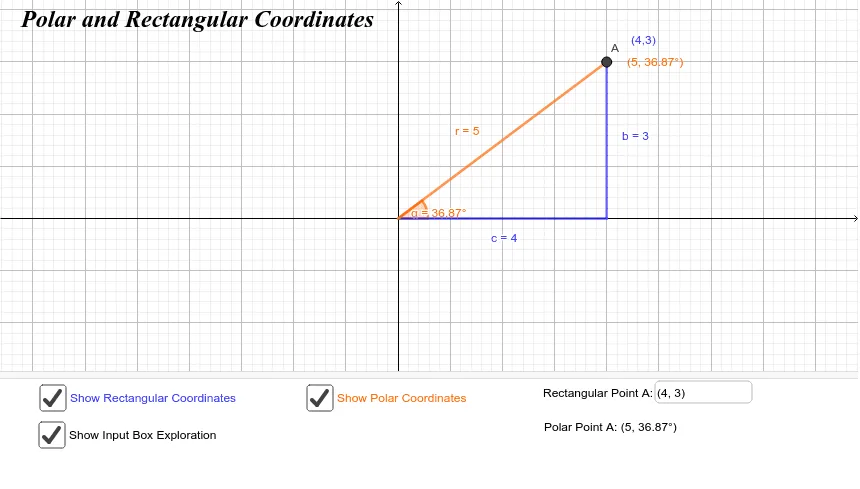
① This interactive applet demonstrates the relationship between polar coordinates (r, α) and rectangular coordinates (x, y) for a point in the plane, allowing users to see how the same location is represented in both systems. ② Core mathematical concepts include polar and Cartesian coordinate definitions, angle measurement, coordinate axes, and the conversion formulas between the two systems. ③ Construction details: The applet uses GeoGebra commands such as OrthogonalLine to create perpendicular lines, Intersect to find intersection points, Segment to draw line segments, Point to mark key points, Angle to display the polar angle, and Textfield/InputBox for user input. Objects include A, f, B, b, C, c, D, α, r, e, g, xa, ya, and multiple text labels, all linked dynamically. ④ Suitable for high school or early college students learning analytic geometry or introductory calculus, and useful for classroom demonstrations or self-study to build intuition about coordinate transformations.
GeoGebra Commands & Parameters
OrthogonalLine(A, xAxis) → fIntersect(f, xAxis) → BSegment(B, A) → bIntersect(xAxis, yAxis) → CSegment(C, B) → cPoint(xAxis) → DAngle(D, C, A) → αSegment(C, A) → rTextfield(A) → InputBox1
AI Drawing Prompt Reference
Create an interactive coordinate demonstration: draw a Cartesian plane with two perpendicular axes intersecting at the origin. Place a point on the horizontal axis, then draw a vertical line through this point perpendicular to the x-axis. Choose a movable point above the x-axis on this vertical line. Connect this point to the origin with a segment, and also connect it to the foot of the perpendicular on the x-axis with another segment. Mark the angle from the positive x-axis to the segment connecting the origin and the movable point, displaying its measure. Add a text input box near the movable point to adjust its position. The figure illustrates the relationship between polar and rectangular coordinates, including axes, perpendicular lines, segments, angle annotation, and an input field.
The prompt above was compiled from the original drawing commands and is for reference only.