
Points on Two Lines – Simultaneous Equations Demo
Loading the math board and drawing, please wait…
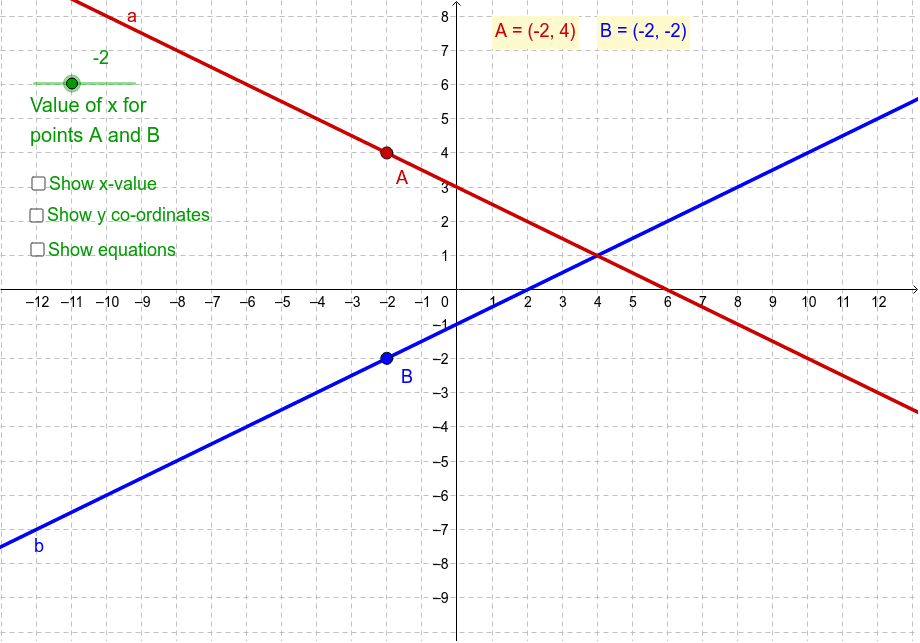
① This example shows the intersection point of two lines in the plane and illustrates that each line equation has infinitely many solutions, while only the intersection satisfies both equations simultaneously. ② Core concepts include analytic geometry line equations, systems of linear equations, and solving for intersection coordinates. ③ Construction uses GeoGebra commands Intersect, Line, Segment, OrthogonalLine, and creates objects such as points Position, A, B, C and text labels. ④ Suitable for middle‑school (grade 8) to early high‑school coordinate geometry lessons, as well as self‑study or classroom demonstration of the geometric meaning of simultaneous equations.
GeoGebra Commands & Parameters
Intersect(b, e) → BIntersect(a, e) → ALine(B, yAxis) → cSegment(B, A) → dOrthogonalLine(A, yAxis) → gOrthogonalLine(B, yAxis) → jIntersect(g, yAxis) → CIntersect(j, yAxis) → ESegment(C, A) → kSegment(E, B) → l
AI Drawing Prompt Reference
Draw two intersecting lines to demonstrate the geometric meaning of a system of two linear equations. Mark the intersection point. From this point, drop perpendiculars to the y-axis and connect the feet of the perpendiculars to the intersection with segments, forming right-angle triangle structures. The diagram should clearly show that every point on each line satisfies its corresponding equation, while only the intersection point satisfies both simultaneously.
The prompt above was compiled from the original drawing commands and is for reference only.