
Planes in Space
Loading the math board and drawing, please wait…
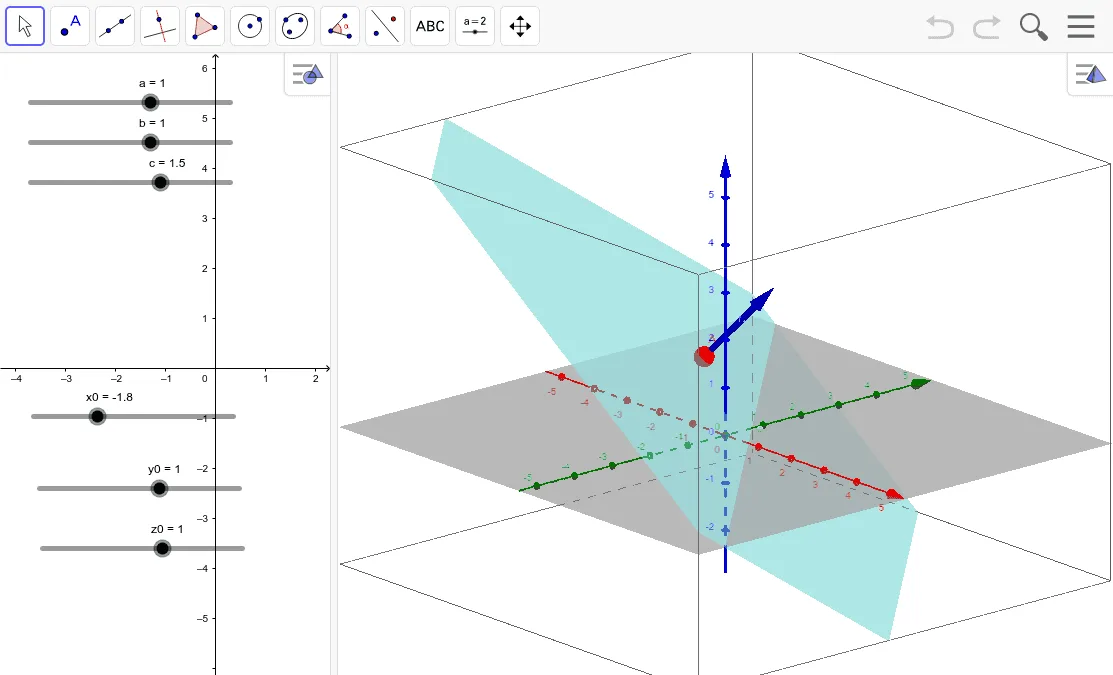
This example demonstrates how to draw and manipulate planes in three-dimensional space. The core mathematical concepts involved include vectors, points, plane equations, and analytical geometry. The construction uses GeoGebra commands like Vector for creating vectors a, b, c, and objects x0, y0, z0, A, e, n to represent points and planes. Suitable for high school and above students learning solid geometry and vector operations.
GeoGebra Commands & Parameters
Vector((x0, y0, z0), (x0 + a, y0 + b, z0 + c)) → n
AI Drawing Prompt Reference
Draw and manipulate three planes in three-dimensional space to demonstrate the core concepts of vectors, points, plane equations, and analytical geometry. Start by creating three vectors, then define three points using these vectors, construct three planes through these points, and finally integrate the vectors, points, and planes to clearly show their relationships and spatial positions.
The prompt above was compiled from the original drawing commands and is for reference only.