
Plane Tiling Example
Loading the math board and drawing, please wait…
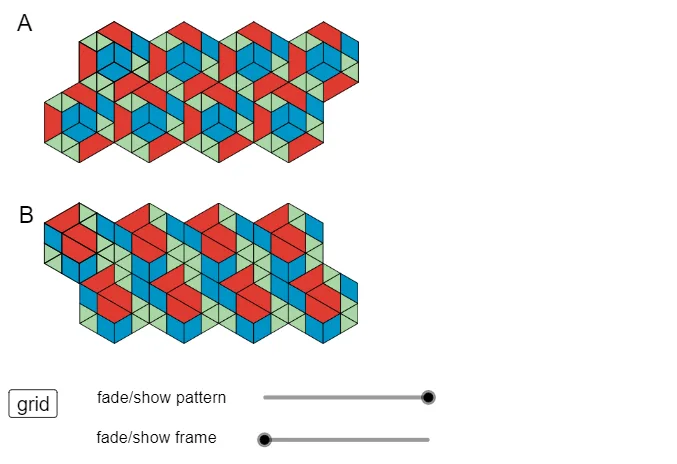
This example demonstrates how to use GeoGebra tools for geometric constructions of plane tilings, involving concepts like polygonal tiling, symmetry, and spatial packing. It utilizes commands such as Tool3, Tool2, Tool1 and objects like A_7, B_4, poly1, f, g, h, i, C_7, D_4, poly2, j, k, l, m, E, F, poly3, n, p, q, r, K_3, poly6, L_3, g_1, h_1, i_1, j_1, M, poly7, N, k_1, l_1, m_1, n_1, O, P, p_1, q_1, r_1. Suitable for middle school students and above for learning geometric constructions and spatial geometry, or for classroom demonstrations.
GeoGebra Commands & Parameters
Tool3(A_7) → B_4, poly1, f, g, h, iTool3(C_7) → D_4, poly2, j, k, l, mTool3(E) → F, poly3, n, p, q, rTool2(K_3) → poly6, L_3, g_1, h_1, i_1, j_1Tool2(M) → poly7, N, k_1, l_1, m_1, n_1Tool1(O) → P, p_1, q_1, r_1, poly8Tool1(Q) → R, s_1, t_1, a_1, poly9Tool1(S) → T, b_1, c_1, d_1, poly10Tool1(U) → V, e_1, f_2, g_2, poly11Tool1(W) → Z, h_2, i_2, j_2, poly12Tool1(A_1) → B_1, k_2, l_2, m_2, poly13Tool1(C_1) → D_1, n_2, p_2, q_2, poly14Tool3(A_2) → B_2, poly1_1, f_3, g_3, h_3, i_3Tool3(C_2) → D_2, poly2_1, j_3, k_3, l_3, m_3Tool3(E_1) → F_1, poly3_1, n_3, p_3, q_3, r_2Tool2(G_1) → poly4_1, H_1, s_2, t_2, a_2, b_2Tool2(K_1) → poly6_1, L_1, g_4, h_4, i_4, j_4Tool2(M_1) → poly7_1, N_1, k_4, l_4, m_4, n_4Tool1(O_1) → P_1, p_4, q_4, r_3, poly8_1Tool1(Q_1) → R_1, s_3, t_3, a_3, poly9_1Tool1(S_1) → T_1, b_3, c_3, d_3, poly10_1Tool1(U_1) → V_1, e_3, f_5, g_5, poly11_1Tool1(W_1) → Z_1, h_5, i_5, j_5, poly12_1Tool1(A_3) → B_3, k_5, l_5, m_5, poly13_1Tool1(C_3) → D_3, n_5, p_5, q_5, poly14_1Tool2(G_2) → poly4_2, H_2, s_4, t_4, a_5, b_5Tool2(I_2) → poly5_2, J_2, c_4, d_4, e_4, f_6Tool2(K_2) → poly6_2, L_2, g_6, h_6, i_6, j_6
AI Drawing Prompt Reference
Draw a geometric plane tiling pattern showing complex structures formed by polygonal arrangements through symmetry and spatial packing. Start by constructing several base polygons, then use tools to combine them into larger units and repeat the arrangement to form a seamless tiling. Maintain geometric relationships and symmetry between parts, resulting in an aesthetically pleasing and mathematically beautiful plane pattern.
The prompt above was compiled from the original drawing commands and is for reference only.