
Place Value with Number Dots
Loading the math board and drawing, please wait…
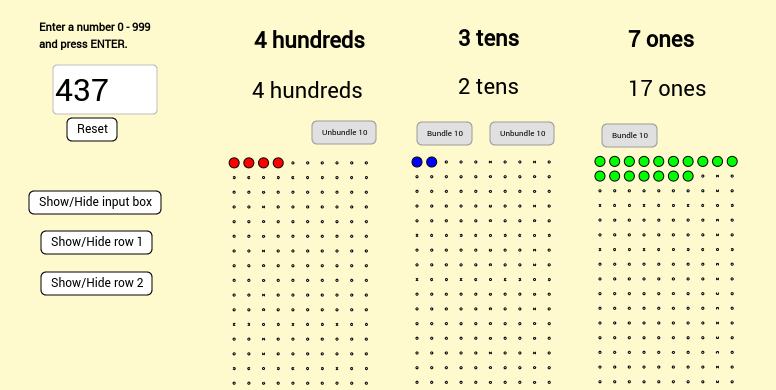
This example uses number dots to illustrate place value, specifically the ones, tens, and hundreds. It covers key mathematical concepts such as place value, carrying, and borrowing. The construction uses commands like Sequence, Textfield, Mod, Flatten, and Vector, suitable for upper elementary or middle school students learning place value.
GeoGebra Commands & Parameters
Sequence(Sequence[(x(A) + ((i - 1) * horizontalspacing), y(A) - ((j - 1) * verticalspacing)), i, 1, numberofcolumns], j, 1, numberofrows) → bigonesarraySequence(Sequence[(x(B) + ((i - 1) * horizontalspacing), y(B) - ((j - 1) * verticalspacing)), i, 1, numberofcolumns], j, 1, numberofrows) → bigtensarraySequence(Sequence[(x(C) + ((i - 1) * horizontalspacing), y(C) - ((j - 1) * verticalspacing)), i, 1, numberofcolumns], j, 1, numberofrows) → bighundredsarrayTextfield(inputtext) → InputBox1Mod(inputnumber, 10) → actualonesFlatten(bighundredsarray) → flathundredsarrayFlatten(bigtensarray) → flattensarrayFlatten(bigonesarray) → flatonesarraySequence(Element[flathundredsarray, i], i, 1, displayhundreds) → displaydotshundredsSequence(Element[flattensarray, i], i, 1, displaytens) → displaydotstensSequence(Element[flatonesarray, i], i, 1, displayones) → displaydotsonesVector(D, E) → u
AI Drawing Prompt Reference
Create a number dot array to illustrate the place value of ones, tens, and hundreds. First, create a grid for the hundreds, tens, and ones. Then, display the corresponding dots based on the input number. Finally, show the dots for the ones place using the modulo 10 result of the input number.
The prompt above was compiled from the original drawing commands and is for reference only.