
Plücker Cone
Loading the math board and drawing, please wait…
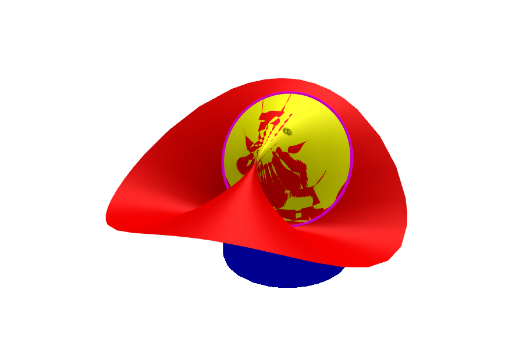
This example demonstrates the construction of the Plücker cone, a special type of quadratic cone. It involves core concepts from vector and coordinate geometry. Using the Surface and CurveCartesian commands, the generation process of the cone can be dynamically displayed. Suitable for high school mathematics education and students learning coordinate geometry.
GeoGebra Commands & Parameters
Surface(u, v, (a * (u^(2) - v^(2)) / (u^(2) + v^(2))), u, (-U), U, v, (-V), V) → pluckerSurface(b + ((u * sqrt(b^(2) + c^(2))) * cos(v)), c + ((u * sqrt(b^(2) + c^(2))) * sin(v)), (a * ((b + ((u * sqrt(b^(2) + c^(2))) * cos(v)))^(2) - (c + ((u * sqrt(b^(2) + c^(2))) * sin(v)))^(2)) / ((b + ((u * sqrt(b^(2) + c^(2))) * cos(v)))^(2) + (c + ((u * sqrt(b^(2) + c^(2))) * sin(v)))^(2))) + h1 + h2, u, 0, 1, v, (-V), V) → plucker3CurveCartesian(b + (sqrt(b^(2) + c^(2)) * cos(t)), c + (sqrt(b^(2) + c^(2)) * sin(t)), ((-a) * ((c * (c + (sqrt(b^(2) + c^(2)) * sin(t)))) - (b * (b + (sqrt(b^(2) + c^(2)) * cos(t)))) + b^(2) - c^(2)) / (b^(2) + c^(2))) + h1 + h2, t, (-π), π) → dSurface(b + (sqrt(b^(2) + c^(2)) * cos(u)), c + (sqrt(b^(2) + c^(2)) * sin(u)), ((-a) * ((c * (c + (sqrt(b^(2) + c^(2)) * sin(u)))) - (b * (b + (sqrt(b^(2) + c^(2)) * cos(u)))) + b^(2) - c^(2)) / (b^(2) + c^(2))) - v + h1, u, (-π), π, v, 0, 10) → eSurface((u * cos(v)), (u * sin(v)), (a * cos((2 * v))), u, 0, U, v, (-V), V) → plucker2
AI Drawing Prompt Reference
Draw a Plücker cone, a special type of quadratic cone. Use the Surface command with parameters u and v to generate the cone's surface. First, draw a basic Plücker cone, then modify parameters b, c, and h1, h2 to create a more complex Plücker cone. Next, use the CurveCartesian command to draw the base of the cone. Finally, draw a cone surface with parameters a and v.
The prompt above was compiled from the original drawing commands and is for reference only.