
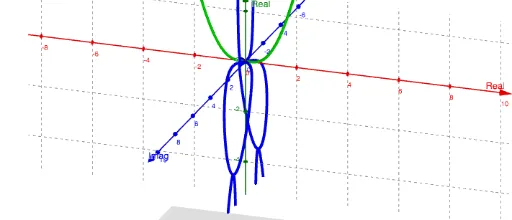
Phantom Graph of x^4/(1+x^2)
Loading the math board and drawing, please wait…
In collections
Phantom Graphs
This example demonstrates the phantom graph of the function f(x) = x^4/(1+x^2). The core mathematical concepts involved are function graphs and complex numbers. Using commands such as ComplexRoot and CurveCartesian, the phantom graph of the function can be constructed. Suitable for high school and above students to learn about function graphs and complex numbers.
GeoGebra Commands & Parameters
ComplexRoot(x^(4) - (c * (x^(2) + 1))) → z_1, z_2, z_3, z_4Plane((0, c, 0), (1, c, 0), (0, c, 1)) → aCurveCartesian(((-sqrt((4 * t) - t^(2)))) / ((2 * sqrt(t + (2 * sqrt(t))))), (-t), sqrt(t / 4 + sqrt(t) / 2), t, 0, 4) → eCurveCartesian(sqrt((4 * t) - t^(2)) / ((2 * sqrt(t + (2 * sqrt(t))))), (-t), (-sqrt(t / 4 + sqrt(t) / 2)), t, 0, 4) → hCurveCartesian(((-sqrt((4 * t) - t^(2)))) / ((2 * sqrt(t + (2 * sqrt(t))))), (-t), (-sqrt(t / 4 + sqrt(t) / 2)), t, 0, 4) → iCurveCartesian(0, t^(4) / (1 - t^(2)), t, t, -25, 25) → bCurveCartesian(sqrt((4 * t) - t^(2)) / ((2 * sqrt(t + (2 * sqrt(t))))), (-t), sqrt(t / 4 + sqrt(t) / 2), t, 0, 4) → d
AI Drawing Prompt Reference
Draw the imaginary part graph of the function f(x) = x^4/(1+x^2). First, find the complex roots z1, z2, z3, z4 of the function. Then, draw a plane a on the c-plane. Next, use the CurveCartesian command to draw four curves e, h, i, and d. Finally, draw a curve b to show the real part of the function.
The prompt above was compiled from the original drawing commands and is for reference only.