
Perpendicular Bisector Quick Recap
Loading the math board and drawing, please wait…
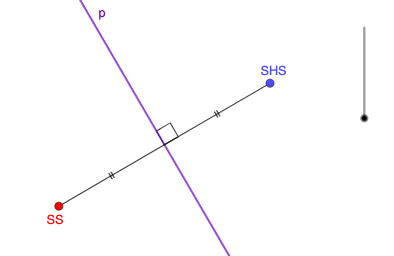
This example demonstrates how to construct the perpendicular bisector of a line segment and its related properties. Key math concepts involved include line segments, straight lines, special points, translation, similar triangles, and circles. The construction uses GeoGebra commands and objects such as LineBisector, Segment, Intersect, Angle, and Point as outlined in the summary. It is suitable for middle school and above students to understand and master the geometric properties and construction methods of perpendicular bisectors.
GeoGebra Commands & Parameters
LineBisector(SS, SHS) → fSegment(SS, SHS) → gIntersect(f, g) → AAngle(g, f) → αSegment(SS, A) → hSegment(A, SHS) → iPoint(f) → BSegment(B, SS) → jSegment(B, SHS) → k
AI Drawing Prompt Reference
Draw a line segment, then construct its perpendicular bisector. Find the intersection point between the perpendicular bisector and the original segment, which is the midpoint of the segment. Mark the angle between the segment and its perpendicular bisector. Take any point on the perpendicular bisector and connect it to both endpoints of the original segment, creating two new line segments. This demonstrates that any point on the perpendicular bisector is equidistant from the endpoints of the segment.
The prompt above was compiled from the original drawing commands and is for reference only.