
Pentagonal Pyramid by Antoinette Olivares
Loading the math board and drawing, please wait…
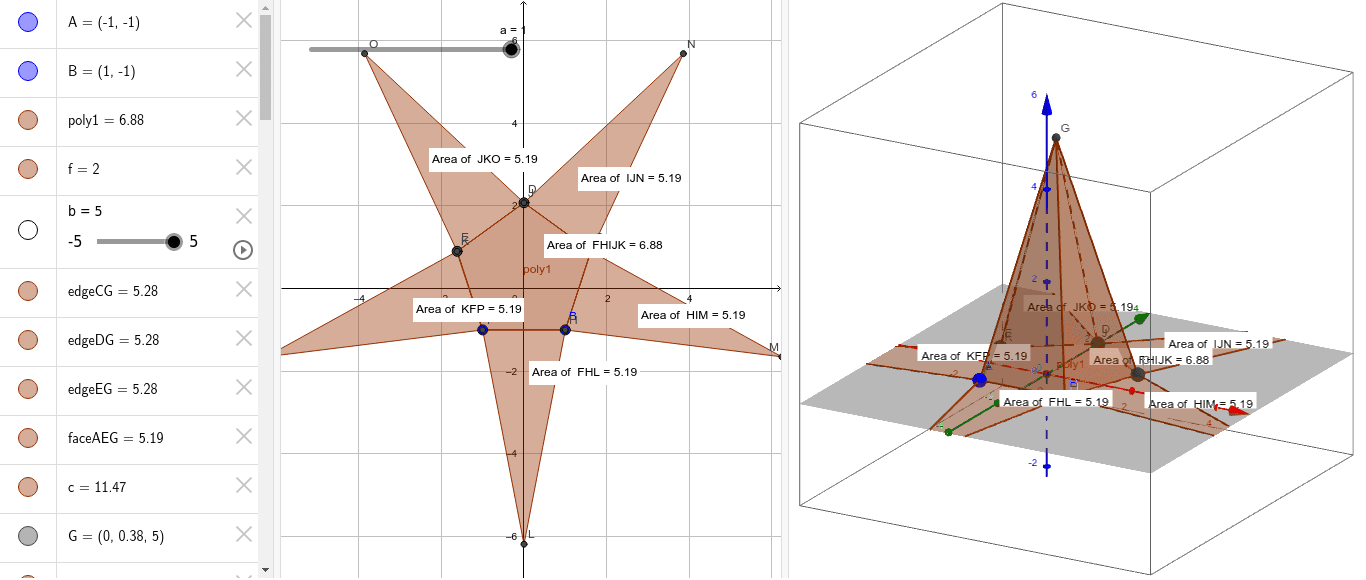
This example demonstrates the construction of a pentagonal pyramid. It involves key concepts in polygons and solid geometry. Using commands like Polygon, Pyramid, and Net, the base and sides of the pentagonal pyramid can be constructed. Suitable for middle and high school students studying solid geometry.
GeoGebra Commands & Parameters
Polygon(A, B, 5) → poly1, f, g, h, i, j, C, D, EPyramid(poly1, b) → c, G, edgeDG, edgeEG, faceABG, faceBCG, faceCDG, faceDEG, faceAEG, edgeAG, edgeBG, edgeCGNet(c, a) → d, F, P, faceFHIJK, faceFHL, faceHIM, faceIJN, faceJKO, faceFKP, edgeFH, edgeHI, edgeIJ, H, edgeJK, edgeFK, edgeFL, edgeHL, edgeHM, edgeIM, edgeIN, edgeJN, edgeJO, edgeKO, I, edgeKP, edgeFP, J, K, L, M, N, OPointIn(faceJKO) → PointfaceJKOPointIn(faceIJN) → PointfaceIJNPointIn(faceFHIJK) → PointfaceFHIJKPointIn(faceFKP) → PointfaceFKPPointIn(faceFHL) → PointfaceFHLPointIn(faceHIM) → PointfaceHIM
AI Drawing Prompt Reference
Draw a net of a pentagonal pyramid. Start with a regular pentagon as the base. From this base, construct a pyramid with an apex above the center. Then unfold the lateral faces so they lie flat around the base, resulting in a planar arrangement of five triangles surrounding the pentagon. Place a point inside each triangular face and inside the pentagonal face to mark them. The final image should clearly show both the 3D pyramid and its flattened net.
The prompt above was compiled from the original drawing commands and is for reference only.