
Partial Products to Multiply Whole Numbers: Interactive Slider Tool
Loading the math board and drawing, please wait…
In collections
Elementary School Applets
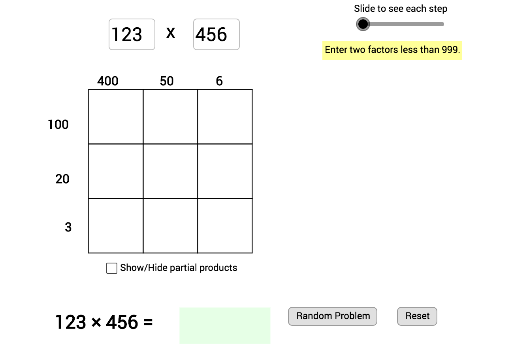
① This GeoGebra example demonstrates the partial products method for multiplying whole numbers using an interactive grid and sliders. ② It covers the core math concept of decomposing multi-digit factors into hundreds, tens, and units, then multiplying each pair and summing the results, reinforcing the distributive property and place value. ③ The construction uses commands like Vector, Polygon, Segment, Random, and Textfield to build the visual grid, generate random problems, and display labeled partial products (e.g., F1HxF2HLabel) for each combination of digits. Sliders allow users to adjust factors or press 'New problem' for random practice. ④ Suitable for upper elementary to middle school students, this tool serves as a classroom demonstration or self-paced exercise to build fluency in multi-digit multiplication and mental math strategies.
GeoGebra Commands & Parameters
Vector(Q, R) → uVector(S, T) → vVector(U, V) → wPolygon(A, B, H, E) → poly1, a, b, h, ePolygon(E, H, I, F) → poly2, e_1, h_1, i, fPolygon(F, I, J, G) → poly3, f_1, i_1, j, gPolygon(B, C, K, H) → poly4, b_1, c, k, h_2Polygon(H, K, L, I) → poly5, h_3, k_1, l, i_2Polygon(I, L, M, J) → poly6, i_3, l_1, m, j_1Polygon(C, D, N, K) → poly7, c_1, d, n, k_2Polygon(K, N, O, L) → poly8, k_3, n_1, o, l_2Polygon(L, O, P, M) → poly9, l_3, o_1, p, m_1Segment(W, Z) → qRandom(11, 150) → random1Random(11, 110) → random2Polygon(B_1, C_1, D_1, E_1) → BoxForAnswer, b_2, c_2, d_1, e_2Textfield(inputfactoronetext) → inputfactor1Textfield(inputfactortwotext) → inputfactor2
AI Drawing Prompt Reference
Create an interactive grid for demonstrating the partial products method of multiplying whole numbers. The grid consists of nine rectangular cells arranged in three rows and three columns, each representing a digit combination (hundreds, tens, units). Above and to the left of the grid, place sliders to adjust the hundreds, tens, and units digits of two factors. Inside each cell, display the corresponding partial product, such as hundreds times hundreds. Below the grid, include an input field for the final answer and a button to generate a random new problem. The layout should be clear and suitable for classroom demonstration.
The prompt above was compiled from the original drawing commands and is for reference only.