
Parking Garage Floors
Loading the math board and drawing, please wait…
In collections
Negative Zahlen - Einführung
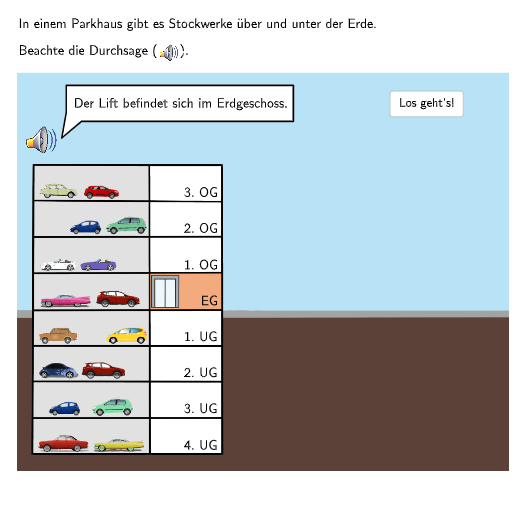
This example uses a number line to demonstrate the concept of floors in a parking garage, involving the comparison and ordering of integers. It utilizes GeoGebra commands such as If, Rotate, and SelectedIndex for dynamic floor displays. Suitable for 5-6th grade students to learn the application of integers in real-world scenarios.
GeoGebra Commands & Parameters
If(step ≤ 6, Fa, Fb) → FRotate(F + (0.8, 0), 40°, F) → F1SelectedIndex(DropDown7) → input7SelectedIndex(DropDown8) → input8SelectedIndex(DropDown6) → input6SelectedIndex(DropDown5) → input5SelectedIndex(DropDown4) → input4SelectedIndex(DropDown3) → input3Sequence(P0 + (0, (m * heightstock)), m, 0, 7) → liftpoints1Point(liftpoints1) → AIndexOf(A, liftpoints1) → stock1originalSequence(Q1 + (0, (m * heightstock)), m, 0, 7) → liftpoints2Point(liftpoints2) → CIndexOf(C, liftpoints2) → stock2originalPoint(Line[Fb, xAxis]) → GRotate(G + (0.8, 0), (180 + 40)°, G) → G1Point(Line[F1 + (0, sizebubble), xAxis]) → F3Textfield(input1) → Eingabefeld1Textfield(input2) → Eingabefeld2Point(Line[P1, xAxis]) → P2Point(Line[A, xAxis]) → BPolygon(A, A + (widthlift, 0), A + (widthlift, (-heightlift)), A + (0, (-heightlift))) → d1, f, g, h, iPoint(Line[C, xAxis]) → DPolygon(C, C + (widthlift, 0), C + (widthlift, (-heightlift)), C + (0, (-heightlift))) → d2, c, j, k, lPoint(Line[E, xAxis]) → IRotate(F + (0.8, 0), (2 * 40°), F) → F2Rotate(G + (0.8, 0), (180 + (2 * 40))°, G) → G2Point(Line[G1 + (0, (-sizebubble) - 0.5), xAxis]) → JIf(step > 1, (9.9009, 0.64103), (8.3, 0.64103)) → F4Join({Sequence[Text[(("\textsf\normalsize{" * ReplaceAll["" + (m) + ((". OG" * "")), "-", ""]) * "}"), (x(P0) + 1.6, ((-heightstock) * m) + y(P0) - 3.45), true, true, -0, 1], m, 1, 3], Sequence[Text[(("\textsf\normalsize{" * ReplaceAll["" + (m) + ((". UG" * "")), "-", ""]) * "}"), (x(P0) + 1.6, ((-heightstock) * m) + y(P0) - 3.45), true, true, -0, 1], m, -4, -1], Sequence[Text["\textsf\normalsize{EG}", (x(P0) + 1.86, ((-heightstock) * m) + y(P0) - 3.45), true, true, -0, 1], m, 0, 0]}) → lifttext1Join({Sequence[Text[((("\textsf\normalsize{" * "+") * m) * "}"), (x(Q0) + 0.4, ((-heightstock) * m) + y(Q0) - 3.45), true, true, -0, 1], m, 1, 3], Sequence[Text[((("\textsf\normalsize{" * "--") * abs(m)) * "}"), (x(Q0) + 0.4, ((-heightstock) * m) + y(Q0) - 3.45), true, true, -0, 1], m, -4, -1], Sequence[Text["\textsf\normalsize{0}", (x(Q0) + 0.54, ((-heightstock) * m) + y(Q0) - 3.45), true, true, -0, 1], m, 0, 0]}) → lifttext2
AI Drawing Prompt Reference
Create a coordinate plane with a horizontal number line. On the number line, build two reference shapes by taking two base points on the line, offsetting them slightly to the right, and rotating the offsets about their respective base points to form two slanted guides. Then, at multiple levels along the same vertical spacing, generate stacks of points above the number line and use those levels to place rectangular “floor/parking garage” blocks by connecting corners to form each platform outline. Add dropdown-style inputs to choose the floor/step integers, and place text near the number line to label the selected floor values (including negative forms) plus static labels such as “EG” and “0” on the relevant side.
The prompt above was compiled from the original drawing commands and is for reference only.