
Parametric Torus
Loading the math board and drawing, please wait…
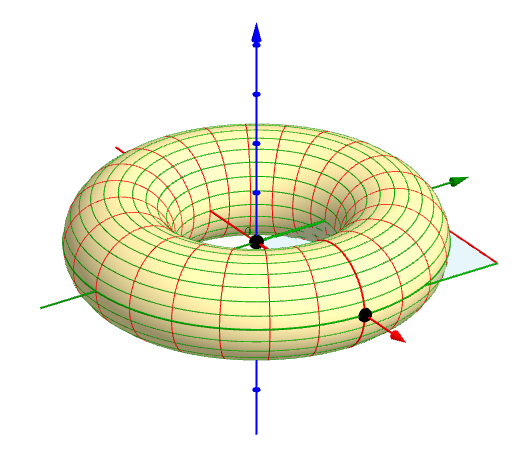
This GeoGebra example demonstrates how to describe a torus and other surfaces of revolution using parametric equations. It involves concepts of parametric curves and surfaces, utilizing commands like Segment, Point, Polygon, Surface, and CurveCartesian. Suitable for high school and above students learning calculus and solid geometry.
GeoGebra Commands & Parameters
Segment(A, ((2 * π), y(A))) → aPoint(a) → BSegment(A, (x(A), (2 * π))) → bPoint(b) → CPolygon(A, B, D, C) → poly1, a_1, c, f, eSurface(((5 + (2 * cos(u))) * cos(t)), ((5 + (2 * cos(u))) * sin(t)), (2 * sin(u)), u, x(A), x(B), t, y(A), y(C)) → dSegment(A, B) → gSegment(A, C) → hCurveCartesian(((5 + (2 * cos(u))) * cos(y(A))), ((5 + (2 * cos(u))) * sin(y(A))), (2 * sin(u)), u, x(A), x(B)) → iCurveCartesian(((5 + (2 * cos(x(A)))) * cos(t)), ((5 + (2 * cos(x(A)))) * sin(t)), (2 * sin(x(A))), t, y(A), y(C)) → jSegment(C, D) → kSegment(D, B) → lCurveCartesian(((5 + (2 * cos(u))) * cos(y(C))), ((5 + (2 * cos(u))) * sin(y(C))), (2 * sin(u)), u, x(A), x(B)) → mCurveCartesian(((5 + (2 * cos(x(B)))) * cos(t)), ((5 + (2 * cos(x(B)))) * sin(t)), (2 * sin(x(B))), t, y(A), y(C)) → nIntersect(p, g) → FIntersect(p, k) → GSegment(F, G) → qSegment(G, F) → rCurveCartesian(((5 + (2 * cos(x(H)))) * cos(t)), ((5 + (2 * cos(x(H)))) * sin(t)), (2 * sin(x(H))), t, y(A), y(C)) → uCurveCartesian(((5 + (2 * cos(u))) * cos(y(H))), ((5 + (2 * cos(u))) * sin(y(H))), (2 * sin(u)), u, x(A), x(B)) → vIntersect(b_1, k) → JIntersect(b_1, g) → KSegment(J, K) → c_1Intersect(d_1, h) → LIntersect(d_1, l) → MSegment(L, M) → e_1CurveCartesian(((5 + (2 * cos(x(F)))) * cos(t)), ((5 + (2 * cos(x(F)))) * sin(t)), (2 * sin(x(F))), t, y(A), y(C)) → oSequence(CurveCartesian[((5 + (2 * cos(u))) * cos(t)), ((5 + (2 * cos(u))) * sin(t)), (2 * sin(u)), u, x(A), x(B)], t, y(A), y(C), 0.2617993877991494) → list1Sequence(CurveCartesian[((5 + (2 * cos(u))) * cos(t)), ((5 + (2 * cos(u))) * sin(t)), (2 * sin(u)), t, y(A), y(C)], u, x(A), x(B), 0.2618) → list2Sequence(Segment[(u, y(A)), (u, y(C))], u, x(A), x(B), 0.2617993877991494) → list3Sequence(Segment[(x(A), v), (x(B), v)], v, y(A), y(C), 0.2618) → list4
AI Drawing Prompt Reference
Draw a torus using parametric equations (5 + 2*cos(u)) * cos(t) and (5 + 2*cos(u)) * sin(t) for the cross-section, and 2*sin(u) for the height. First, draw the cross-section, then rotate it around the central axis to form the torus. Next, draw the boundary lines and auxiliary lines, and finally use the parametric equations to draw the surface of the torus.
The prompt above was compiled from the original drawing commands and is for reference only.