
Parametric Parabola Example 1: Dynamic Triangle and Tangent Construction
Loading the math board and drawing, please wait…
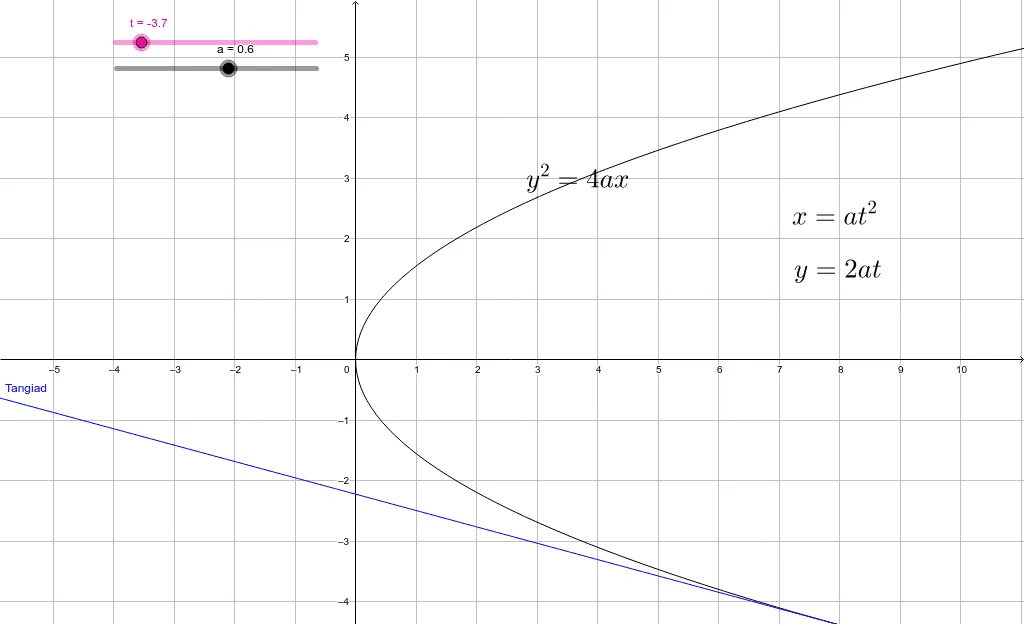
This example demonstrates how to draw a parabola using parametric equations, and explores its geometric properties through a dynamic right triangle and tangent line. The core mathematical concepts include parametric equations, parabolas, tangents, and right triangles. The construction uses GeoGebra objects: parameter t, point A, curve c, text objects text1, text2, text3, and tangent object Tangiad. By varying the parameter, users can observe the motion of a point on the parabola and the associated geometric relationships. Suitable for high school or early college students learning parametric curves and conic sections, and useful for classroom demonstrations.
GeoGebra Commands & Parameters
Numeric t(-3.7)Numeric a(0.6)(((a * t) * t), ((2 * a) * t))((4 * a) * x) = y^(2)(y * t) - x - ((a * t) * t) = 0
AI Drawing Prompt Reference
Draw a parabola defined by parametric equations and demonstrate its dynamic triangle and tangent line construction. Use a slider to control the parameter and observe the motion of a point on the parabola along with the geometric relationships to the dynamic triangle and tangent line. The parabola is defined by parametric equations, and the dynamic triangle and tangent line change as the parameter varies, illustrating the geometric properties of the parabola.
The prompt above was compiled from the original drawing commands and is for reference only.