
Parallelogram Sketch Example
Loading the math board and drawing, please wait…
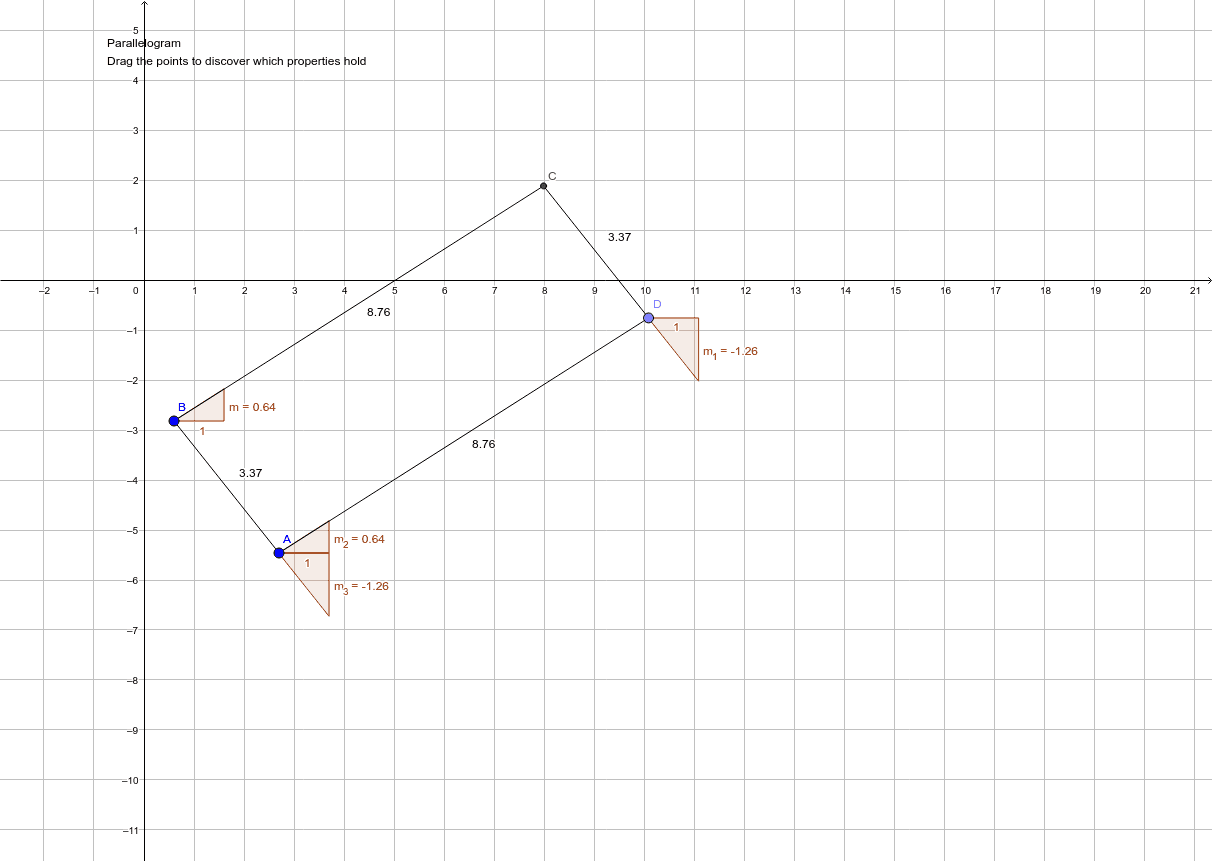
This example demonstrates how to construct a parallelogram and its properties using GeoGebra. It involves core mathematical concepts such as parallelograms, similar triangles, vectors, congruence, and natural numbers. The construction uses commands like Segment, Line, Point, Intersect, and Slope, along with objects like points and segments. Suitable for middle school and above, it helps in understanding parallelogram properties and vector applications.
GeoGebra Commands & Parameters
Segment(A, B) → aLine(C_1, a) → bPoint(b) → DSegment(A, D) → cLine(B, c) → dIntersect(b, d) → CSegment(B, C) → eSegment(D, C) → fSlope(e) → mSlope(f) → m_1Slope(c) → m_2Slope(a) → m_3
AI Drawing Prompt Reference
Please draw a parallelogram. First, draw two line segments as opposite sides. Then, from one endpoint of a line segment, draw a line intersecting the extension of another line segment to form the vertices of the parallelogram. Next, connect these points to form line segments, ensuring that opposite sides are parallel. You can also calculate the slopes of these line segments to demonstrate the geometric properties of the parallelogram.
The prompt above was compiled from the original drawing commands and is for reference only.