
Parallelogram Properties Exploration
Loading the math board and drawing, please wait…
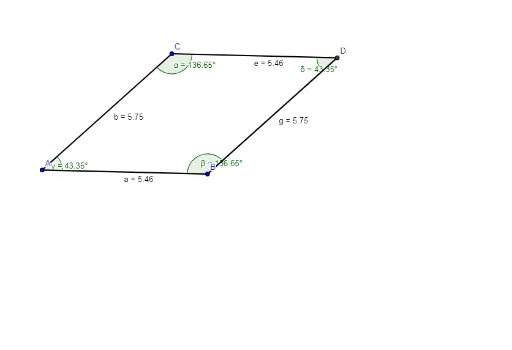
This GeoGebra example demonstrates the fundamental properties of a parallelogram: opposite sides are parallel and equal, and opposite angles are equal. The core mathematical concepts involve the definition, properties, and criteria of parallelograms, as well as the quantitative relationships between angles and line segments. Construction: Use the Segment command to draw four sides AB, BC, CD, and DA forming the quadrilateral; employ the Line command to draw diagonals AC and BD; apply the Intersect command to mark the intersection point; use the Angle command to measure the four interior angles α, β, γ, δ to verify that opposite angles are equal. This example is suitable for middle school geometry teaching, helping students discover and verify parallelogram properties through dynamic geometry software while developing spatial concepts and logical reasoning abilities.
GeoGebra Commands & Parameters
Segment(A, B) → aSegment(A, C) → bLine(C, a) → cLine(B, b) → dIntersect(c, d) → DSegment(C, D) → eSegment(B, D) → fSegment(B, D) → gAngle(A, C, D) → αAngle(D, B, A) → βAngle(B, A, C) → γAngle(C, D, B) → δ
AI Drawing Prompt Reference
Draw a parallelogram with sides AB, BC, CD, and DA. Draw diagonals AC and BD, and mark their intersection point D. Measure the four interior angles α, β, γ, δ to verify that opposite angles are equal. The figure should clearly show the properties of a parallelogram, suitable for teaching.
The prompt above was compiled from the original drawing commands and is for reference only.