
Parallelogram Properties Exploration by Ben Graber
Loading the math board and drawing, please wait…
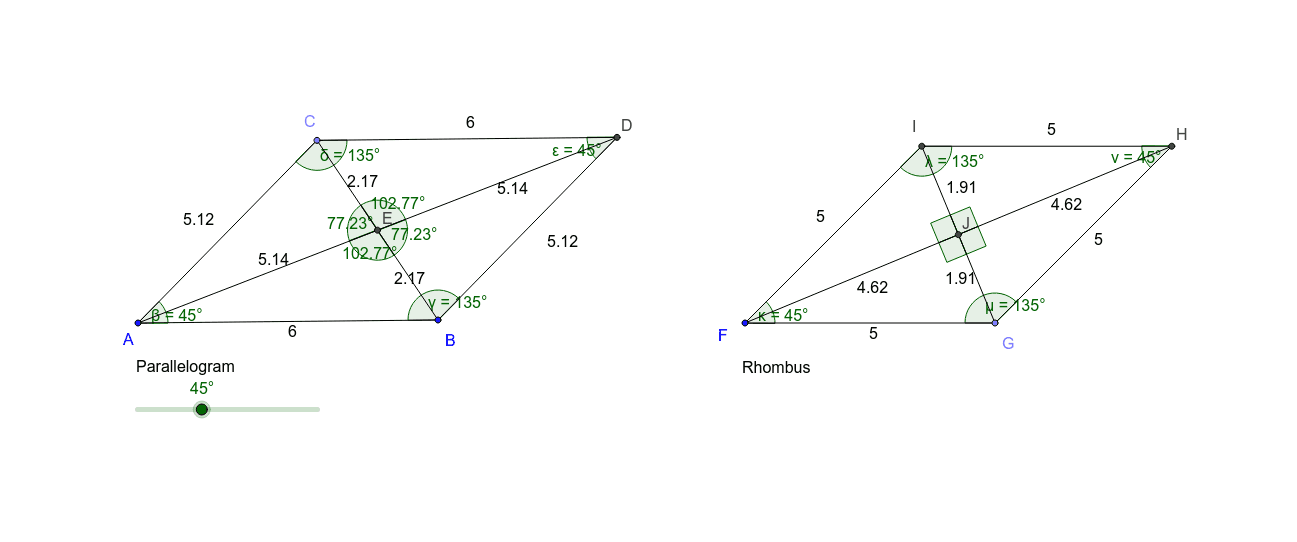
This interactive GeoGebra applet is designed to help learners explore the properties of parallelograms through dynamic manipulation. It demonstrates key concepts such as opposite sides being parallel and equal, opposite angles being equal, and consecutive angles being supplementary. The construction uses GeoGebra commands including Segment, Rotate, Angle, Point, Line, and Intersect, creating vertices A and B, rotated copies A' and B', and multiple angle markers (α, β, γ, etc.) along with auxiliary segments (c, d, e, etc.). By dragging vertices, users can observe how measurements change while properties remain invariant. Suitable for middle school geometry lessons or self-study, this applet serves as a visual and interactive tool for understanding parallelogram characteristics and their proofs.
GeoGebra Commands & Parameters
Segment(A, B) → aRotate(B, α, A) → B'Angle(B, A, B') → βRotate(A, (-(180° - α)), B) → A'Angle(A', B, A) → γSegment(A, B') → bPoint(b) → CLine(C, a) → cLine(B, b) → dIntersect(c, d) → DSegment(A, C) → eSegment(C, D) → fSegment(D, B) → gSegment(C, B) → hSegment(A, D) → iIntersect(h, i) → EAngle(A, C, D) → δAngle(C, D, B) → εSegment(E, C) → jSegment(E, D) → kSegment(E, B) → lSegment(E, A) → mAngle(C, E, A) → ζAngle(D, E, C) → ηAngle(B, E, D) → θAngle(A, E, B) → ιPoint(Circle[F, 5]) → GSegment(F, G) → nRotate(G, α, F) → G'Angle(G, F, G') → κLine(G', n) → pSegment(F, G') → qLine(G, q) → rIntersect(p, r) → HIntersect(p, q) → ISegment(I, H) → sSegment(G, H) → tSegment(G, I) → a_1Segment(F, H) → b_1Angle(F, I, H) → λAngle(H, G, F) → μAngle(I, H, G) → νIntersect(a_1, b_1) → JSegment(J, I) → c_1Segment(J, G) → d_1Segment(F, J) → e_1Segment(J, H) → f_1Angle(H, J, I) → ξAngle(I, J, F) → οAngle(G, J, H) → ρAngle(F, J, G) → σ
AI Drawing Prompt Reference
Draw a parallelogram by first creating a base segment, then rotating one endpoint to form a side, and rotating the other endpoint in the opposite direction to form the opposite side, connecting to complete the shape. Pick a point on one side, draw a line through it parallel to the base, intersect with the extension of the other side to get a new point, and connect vertices to form internal auxiliary segments. Mark angles at vertices and at the intersection of diagonals. Then, using another point as center, draw a circle with fixed radius, take a point on the circle, rotate it to form another side, and construct a second parallelogram, marking its angles and diagonal intersection angles.
The prompt above was compiled from the original drawing commands and is for reference only.