
Ovidiu Spiral
Loading the math board and drawing, please wait…
In collections
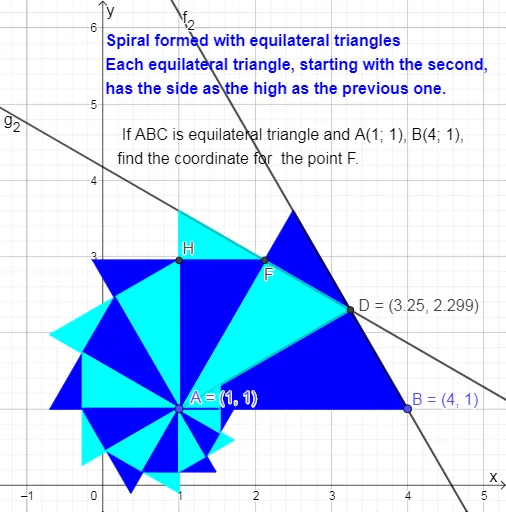
EQUILATERAL TRIANGLE SPIRAL
This example demonstrates the construction of the Ovidiu spiral. It involves geometric construction and parametric equations. Using commands like Polygon, OrthogonalLine, Intersect, Segment, and Line, the spiral can be constructed. Suitable for high school mathematics education and learning.
GeoGebra Commands & Parameters
Polygon(A, B, 3) → poly1, f, g, h, COrthogonalLine(A, g) → iIntersect(g, i) → DSegment(A, D) → jPolygon(A, D, 3) → poly2, k, l, m, EIntersect(l, h) → FPolygon(A, F, 3) → poly3, n, p, q, GIntersect(p, m) → HPolygon(A, H, 3) → poly4, r, s, t, IIntersect(s, q) → JPolygon(A, J, 3) → poly5, a, b, c, KIntersect(b, t) → LPolygon(A, L, 3) → poly6, d, e, f_1, MIntersect(e, c) → NPolygon(A, N, 3) → poly7, g_1, h_1, i_1, OIntersect(h_1, f_1) → PPolygon(A, P, 3) → poly8, j_1, k_1, l_1, QIntersect(i_1, k_1) → RPolygon(A, R, 3) → poly9, m_1, n_1, p_1, SIntersect(n_1, l_1) → TPolygon(A, T, 3) → poly10, q_1, r_1, s_1, UIntersect(r_1, p_1) → VPolygon(A, V, 3) → poly11, t_1, a_1, b_1, WIntersect(a_1, s_1) → ZPolygon(A, Z, 3) → poly12, c_1, d_1, e_1, A_1Intersect(d_1, f) → B_1Line(D, B) → f_2Line(F, D) → g_2
AI Drawing Prompt Reference
Start with an equilateral triangle. Using one vertex as a fixed pivot, repeatedly construct new equilateral triangles. Each new triangle's base is determined by the intersection of a side from the previous triangle and a perpendicular line drawn from the pivot to that side. This iteration creates a series of nested equilateral triangles. Connect the outer vertices of consecutive triangles to form a spiral-like polyline. The final figure consists of multiple equilateral triangles and connecting segments, showing a rotating, expanding geometric pattern.
The prompt above was compiled from the original drawing commands and is for reference only.