
Osculating Circle Demo
Loading the math board and drawing, please wait…
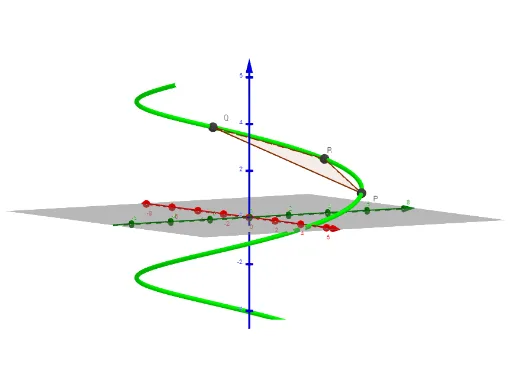
This example demonstrates how to draw the osculating circle at a point on a curve, which is the curvature circle at that point. Key math concepts include curvature, tangent, normal, vectors, derivatives, etc. Construction highlights: GeoGebra commands/objects used are CurveCartesian, Plane, Derivative, Vector, Circle, Line, Polygon; objects include b, h, a, g, f, t, c, P, Δt, R, δt, Q, d, f', f'', f''' , g', g'', g''' , h', h'' , r, rdot1, rdot2, h''' , rdot1xrdot2, κ, tangent, tvector, binormal, bvector, nvector, C, osccircle, tangentline, poly1, p, q, r_1, e. Suitable for university students in mathematics, physics, and related fields to understand and visualize the geometric properties of curves and the concept of osculating circles in differential geometry.
GeoGebra Commands & Parameters
CurveCartesian(f(t), g(t), h(t), t, -5, 5) → cPlane(P, R, Q) → dDerivative(f) → f'Derivative(f') → f''Derivative(f'') → f'''Derivative(g) → g'Derivative(g') → g''Derivative(g'') → g'''Derivative(h) → h'Vector(P, P + tangent) → tvectorVector(P, P + binormal) → bvectorCircle(C, 1 / κ, binormal) → osccircleLine(P, tvector) → tangentlinePolygon(Q, R, P) → poly1, p, q, r_1Circle(Q, R, P) → k
AI Drawing Prompt Reference
Draw a 3D space curve and illustrate its osculating circle at a selected point. Construct the curve first, then pick a point on it. Compute the tangent, normal, and binormal vectors at that point, and draw the tangent line. Determine the osculating plane using the point and two nearby points, then place the osculating circle in that plane with its center at the curvature center and radius equal to the reciprocal of curvature. Also, show the tangent and binormal as vector arrows, and connect relevant points with a polygon for clarity.
The prompt above was compiled from the original drawing commands and is for reference only.