
Orthocenter Construction with GeoGebra
Loading the math board and drawing, please wait…
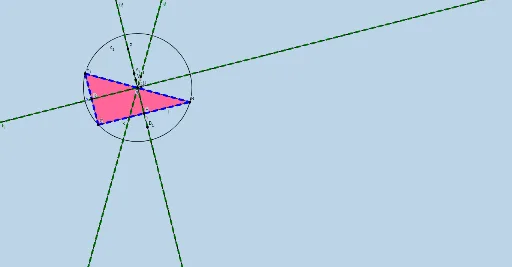
This example demonstrates the construction of a triangle's orthocenter and related geometric elements using GeoGebra. Key math concepts include orthocenter, segments, angle bisectors, vectors, and two-dimensional geometry. The construction involves commands like Polygon, LineBisector, Segment, Intersect, OrthogonalLine, Point, Line, and Circle, as outlined in the summary. Suitable for high school and above, this resource helps learners understand triangle geometry and GeoGebra techniques.
GeoGebra Commands & Parameters
Polygon(A, C, B) → t1, b, a, cLineBisector(b) → fSegment(A, C) → gIntersect(f, b) → DOrthogonalLine(D, b) → hLineBisector(a) → iIntersect(i, a) → EOrthogonalLine(E, a) → jSegment(C, E) → kSegment(E, B) → lOrthogonalLine(E, a) → mOrthogonalLine(E, a) → nIntersect(f, h) → FIntersect(f, h) → GIntersect(i, j) → HIntersect(f, h) → IIntersect(f, h) → JIntersect(f, h) → KIntersect(f, h) → LIntersect(f, h) → MIntersect(f, h) → NIntersect(f, h) → OPoint(n) → PIntersect(f, h) → QIntersect(f, h) → RIntersect(f, h) → SLineBisector(c) → pSegment(A, B) → qSegment(A, B) → rSegment(A, C) → sSegment(C, B) → tLineBisector(c) → dPoint(d) → TOrthogonalLine(T, c) → ePoint(h) → UPoint(n) → VPoint(h) → WPoint(h) → ZLine(W, Z) → f_1Point(n) → A_1Point(n) → B_1Line(A_1, B_1) → g_1Intersect(g_1, f) → C_1Intersect(i, j) → D_1Intersect(i, j) → E_1Intersect(b, c) → F_1Circle(C_1, A) → c_1
AI Drawing Prompt Reference
Draw a triangle and find the intersection point of its three altitudes (orthocenter), while also sketching the altitudes, angle bisectors, vectors, and related segments and circles to illustrate the relationships among these geometric elements. Start by drawing the triangle, then sequentially plot the altitudes and orthocenter, and finally connect the relevant points to form the complete figure.
The prompt above was compiled from the original drawing commands and is for reference only.