
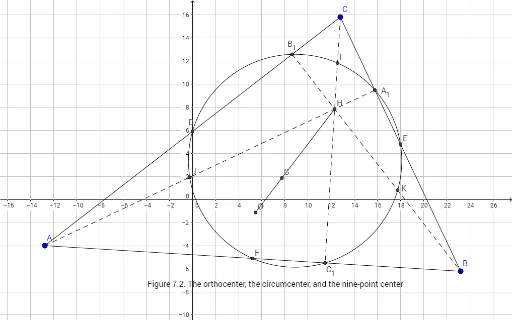
Orthocenter, Circumcenter, and the Nine-Point Circle (Figure 7.2)
Loading the math board and drawing, please wait…
This GeoGebra example demonstrates the geometric relationship among the orthocenter, circumcenter, and the nine-point circle of a triangle. It visually shows how these three key points (and the nine-point circle) are positioned and how they interact. Core mathematical concepts include the orthocenter (intersection of altitudes), circumcenter (intersection of perpendicular bisectors), and the nine-point circle (passing through the midpoints of sides, feet of altitudes, and midpoints of segments from orthocenter to vertices). The construction uses GeoGebra commands such as Segment, Midpoint, Intersect, OrthogonalLine, and Circle to build triangle ABC, its altitudes, perpendicular bisectors, and the nine-point circle with associated points (B₁, A₁, C₁, etc.). This example is suitable for high school geometry or introductory college geometry, helping students explore Euler line, nine-point circle theorem, and observe dynamic changes when dragging vertices.
GeoGebra Commands & Parameters
Segment(A, C) → fSegment(C, B) → gSegment(B, A) → hMidpoint(f) → DMidpoint(g) → EMidpoint(h) → FSegment(C, F) → iSegment(A, E) → jSegment(B, D) → kIntersect(i, j) → GOrthogonalLine(A, g) → lOrthogonalLine(B, f) → mOrthogonalLine(C, h) → nIntersect(m, f) → B_{1}Intersect(l, g) → A_{1}Intersect(n, h) → C_{1}Segment(A, A_{1}) → pSegment(C, C_{1}) → qSegment(B_{1}, B) → rCircle(B_{1}, A_{1}, C_{1}) → cIntersect(p, q) → HIntersect(c, q, 2) → IIntersect(c, p, 2) → JIntersect(c, r, 2) → KOrthogonalLine(F, h) → sOrthogonalLine(D, f) → tOrthogonalLine(E, g) → aIntersect(s, t) → OSegment(O, H) → b