
Order of Rotational Symmetry
Loading the math board and drawing, please wait…
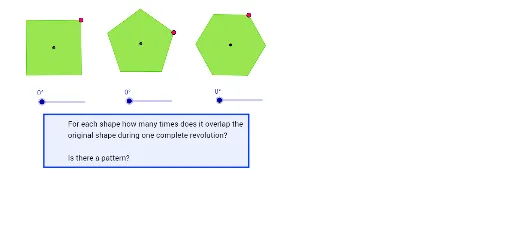
This example demonstrates the concept of order of rotational symmetry. The order of rotational symmetry is the number of times a figure overlaps with itself when rotated around a central point. The example constructs a figure and rotates it to illustrate the calculation of the order of rotational symmetry. It uses commands such as Line, OrthogonalLine, Circle, Intersect, Polygon, Midpoint, Segment, AngularBisector, Ray, and Rotate in GeoGebra. Suitable for middle school and above students learning geometric transformations.
GeoGebra Commands & Parameters
Line(A, B) → aOrthogonalLine(A, a) → bOrthogonalLine(B, a) → cCircle(A, B) → dIntersect(d, b, 2) → COrthogonalLine(C, b) → eIntersect(e, c) → DPolygon(A, B, D, C) → P, a_1, b_1, d_1, c_1Midpoint(C, B) → ESegment(F, G) → fOrthogonalLine(G, f) → gCircle(G, F) → hIntersect(h, g, 1) → HCircle(H, G) → kIntersect(k, g, 2) → ISegment(F, I) → iCircle(F, I) → pLine(G, F) → jIntersect(p, j, 2) → JMidpoint(J, G) → KSegment(J, K) → lCircle(F, l) → qCircle(G, l) → rIntersect(r, q, 1) → LSegment(F, L) → mSegment(L, G) → nAngularBisector(F, G, L) → sAngularBisector(L, F, G) → tIntersect(r, s, 2) → MIntersect(q, t, 1) → NPolygon(M, L, N, G, F) → Q, m_1, l_1, n_1, g_1, f_1Segment(O, R) → e_1Circle(O, R) → h_1Circle(R, O) → k_1Ray(O, R) → i_1Intersect(k_1, i_1, 2) → SCircle(S, R) → p_1Intersect(k_1, h_1, 2) → TIntersect(p_1, k_1, 2) → UIntersect(p_1, k_1, 1) → VIntersect(k_1, h_1, 1) → WPolygon(T, U, S, V, W, O) → Y, t_1, u, s_1, v, w, oMidpoint(M, L) → ZMidpoint(L, N) → A_1Segment(F, A_1) → j_1Segment(Z, G) → q_1Intersect(q_1, j_1) → B_1Rotate(A, α, E) → A'Rotate(B, α, E) → B'Rotate(D, α, E) → D'Rotate(C, α, E) → C'Polygon(A', B', D', C') → P', a', b', d', c'Rotate(M, β, B_1) → M'Rotate(L, β, B_1) → L'Rotate(N, β, B_1) → N'Rotate(G, β, B_1) → G'Rotate(F, β, B_1) → F'Polygon(M', L', N', G', F') → Q', m', l', n', g', f'Rotate(T, γ, R) → T'Rotate(U, γ, R) → U'Rotate(S, γ, R) → S'Rotate(V, γ, R) → V'Rotate(W, γ, R) → W'Rotate(O, γ, R) → O'Polygon(T', U', S', V', W', O') → Y', t', u', s', v', w', o'Polygon(C_1, D_1, E_1, F_1) → poly1, c_2, d_2, e_2, f_2
AI Drawing Prompt Reference
Draw a horizontal segment. Construct perpendicular lines at both endpoints. Draw a circle centered at the left endpoint with radius equal to the segment, intersecting the left perpendicular. Through that intersection, draw a line perpendicular to the left perpendicular, meeting the right perpendicular. Connect the four points to form a rectangle. Take the midpoint of the top side. Construct a regular pentagon with one side on the top side of the rectangle, pointing upward. Construct a regular hexagon with one side on the bottom side of the rectangle, pointing downward. Finally, rotate the entire figure about the midpoint of the top side by an angle to illustrate rotational symmetry.
The prompt above was compiled from the original drawing commands and is for reference only.