
Opposite Angles and Straight Lines
Loading the math board and drawing, please wait…
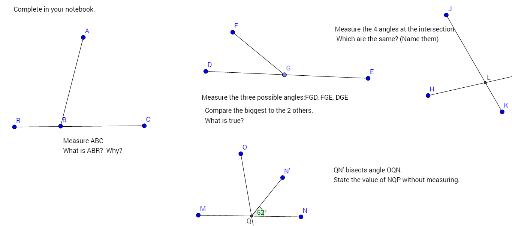
This example demonstrates the relationship between opposite angles and straight lines using GeoGebra. It involves core mathematical concepts such as angles, straight lines, rotation, and intersection. The construction utilizes commands and objects like Segment, Point, Intersect, Rotate, and Angle. Suitable for middle school students and above to understand geometric properties and transformations.
GeoGebra Commands & Parameters
Segment(A, B) → fSegment(D, E) → hPoint(h) → GSegment(F, G) → iSegment(H, I) → jSegment(J, K) → kIntersect(j, k) → LSegment(M, N) → lSegment(O, P) → mIntersect(l, m) → QRotate(N, 52°, Q) → N'Angle(N, Q, N') → αSegment(Q, N') → nSegment(C, R) → p
AI Drawing Prompt Reference
Draw two intersecting lines and mark the intersection point. From the intersection point, draw two line segments parallel to one of the lines. Then, from a point on the other line, draw a line segment intersecting the parallel line segments and mark the intersection point. Rotate one of the line segments around the intersection point by a certain angle, connect the rotated segment to the intersection point, and finally connect the ends of the rotated segment to the ends of the parallel line segments, showing the relationship between the angles formed by the segments before and after rotation.
The prompt above was compiled from the original drawing commands and is for reference only.