
One-Variable Quadratic Functions & Equations: Extremum and Line Construction
Loading the math board and drawing, please wait…
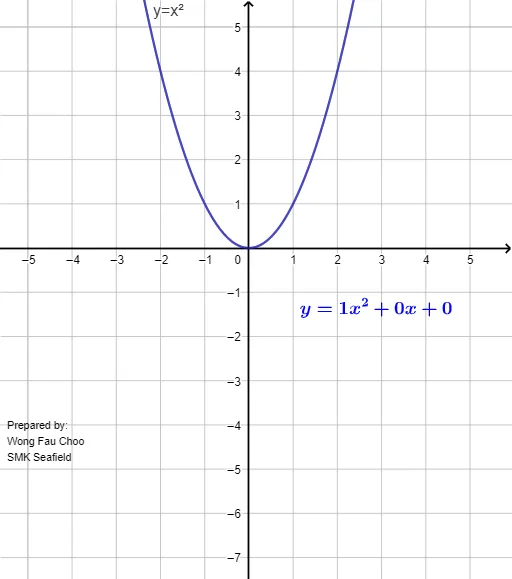
This example demonstrates the relationship between one-variable quadratic functions and quadratic equations through a visual geometry approach. It highlights how the graph of a quadratic function connects to equation solving by using the key geometric feature of the parabola—its extremum (vertex). The construction emphasizes core ideas such as quadratic functions’ shape and symmetry, the extremum/vertex interpretation, and the correspondence between solutions of quadratic equations and intersections on the graph. In GeoGebra, it is built using the commands Extremum and Line, together with multiple created objects (e.g., parameters or points labeled a, b, c, f, g, h, i) and textual annotations (text1, text2, text3) to clearly indicate the function, the critical point, and the involved straight-line relationships. Designed for secondary school and introductory college instruction, it supports interactive learning of graphing, equation interpretation, and optimization-style reasoning.
GeoGebra Commands & Parameters
Extremum(f) → ALine(A, yAxis) → g
AI Drawing Prompt Reference
Draw the graph of a quadratic function as a parabola, and mark its vertex (extremum point). From this vertex, construct a vertical dashed line perpendicular to the horizontal axis, extending down to the x-axis to indicate the axis of symmetry. Add text labels to show the quadratic expression, the coordinates of the vertex, and the relationship between this vertical line and the intersections with the graph and axes. Emphasize the symmetry of the parabola, the vertex as the extremum, and the connection between the parabola and solutions of the corresponding quadratic equation.
The prompt above was compiled from the original drawing commands and is for reference only.